Introduction
Over the past decade, it has become clear that most massive stars are born in binary or multiple-star systems that are close enough to one another to interact. One such interaction is mass transfer, where stars exchange mass and angular momentum. Mass transfer plays a crucial role in producing various stellar phenomena, such as different types of core-collapse supernovae, magnetic stars, X-ray sources, and gravitational wave sources. The nature of these phenomena depends on when the mass transfer occurs and whether it is stable or unstable. In this lab, we will explore mass transfer across the initial binary parameter space.

Fig. 1: Artist’s impression depicting a mass transferring system (Credit: ESO/L. Calçada/M.Kornmesser).
Note
In this lab, we only evolve the primary star (the initially more massive star) in detail, assuming the secondary star (the initially less massive star) as a point mass to reduce computation time. This is done via evolve_both_stars = .false. in binary_job, the default setting.
Task 1. Identifying different mass transfer cases
Mass transfer can be divided into three cases based on the evolutionary phase of the primary star when the transfer occurs. The primary star evolves faster, fills its Roche lobe, and begins transferring mass to the secondary star. The three cases are:
Case A: The primary transfers mass before core hydrogen depletion (core hydrogen burning phase).
Case B: The primary transfers mass after core hydrogen depletion and before core helium depletion (past core hydrogen burning phase and/or during core helium burning phase).
Case C: The primary transfers mass after core helium depletion (past core helium burning phase).
Now, let’s download the MESA work directory from ⬇ here.
Tip
To extract the compressed directory (BinaryEvolution_Lab1.tar) into the current folder, use the following command:
tar -xf BinaryEvolution_Lab1.tarOnce extracted, navigate into the directory with:
cd BinaryEvolution_Lab1Now you are in the MESA work directory for this lab.
inlist_extra contains handles for binary_controls for changing initial binary parameters. What are the current initial primary mass, initial secondary mass, and initial orbital period?Solution 0
Initial secondary mass: 12 Msun
Initial orbital period: 100 days
In Task 1, our goal is to determine during which evolutionary phase the primary star undergoes mass transfer. To this end, we will make step-by-step modifications to src/run_binary_extras.f90.
Important
In run_binary_extras.f90, you can use the quantities internally computed by MESA using the binary pointer b% and star pointers s1%/s2% to access the primary/secondary modules, respectively. In this lab, you will be using the following parameters:
b% s1% center_h1: Hydrogen mass fraction at the center of the primaryb% s1% center_he4: Helium mass fraction at the center of the primaryb% mtransfer_rate: Mass transfer rate in g/s (negative)
We will use these parameters in the extras_binary_finish_step hook in run_binary_extras.f90. You can find the implementation of the MESA binary module in $MESA_DIR/binary/.... For example, you can find the default setting for binary_controls in $MESA_DIR/binary/defaults/binary_controls.defaults.
Task 1.1. Is the primary undergoing mass transfer?
As a first step, within the !!! TASK 1 block !!! of run_binary_extras.f90, add an if condition to check whether the primary star is undergoing mass transfer. A good threshold to determine this is a mass transfer rate greater than
Msun/yr. If this condition is met, make MESA print “Undergoing mass transfer”.
Warning
Don’t forget to do ./clean and ./mk after modifying the run_binary_extras.f90 file.
Hint 1.1 (1)
Check how to make MESA print a message in the terminal in the !!! HINT block !!! in run_binary_extras.f90. It is:
write(*,*) ' ... 'Hint 1.1 (2)
b% mtransfer_rate, is in g/s. Use the constants secyer (seconds in a year) and Msun (solar mass in grams) to convert g/s into Msun/yr. (You can use these in run_binary_extras.f90 thanks to use const_def).Hint 1.1 (3)
Convert mass transfer rate from g/s to Msun/yr
1 year = 3.15576e7 s, 1 Msun = 1.989e33 g
abs(b% mtransfer_rate)/Msun*secyerSolution 1.1
         !!! TASK 1 block begins !!!
         if (abs(b% mtransfer_rate)/Msun*secyer > 1d-10) then
             write(*,*) '****************** Undergoing mass transfer ******************'
         end if
         !!! TASK 1 block ends !!!
Tip
When you do a MESA run as:
./rn | tee out.txtthe terminal output is saved to a file called out.txt.
So, even when you miss the terminal output in real-time, you can review the full output later by checking out.txt.
If you’re looking for specific content, you can search within the file using:
grep -ir XXX out.txtThis command will help you find whether XXX appears anywhere in out.txt.
Please make sure that your implementation is working correctly by running a model and verifying that it produces the desired output when the mass-transfer rate exceeds the threshold. In two PGSTAR plots, you can find the current orbital configuration in window1 and the mass-transfer rate in the upper right corner of window2 (lg_mtransfer_rate: mass transfer rate in Msun/yr in logarithmic scale). (You might see weird features in the orbital configuration if the mass transfer rate becomes very high, and this is an artifact of the plotting scheme.)
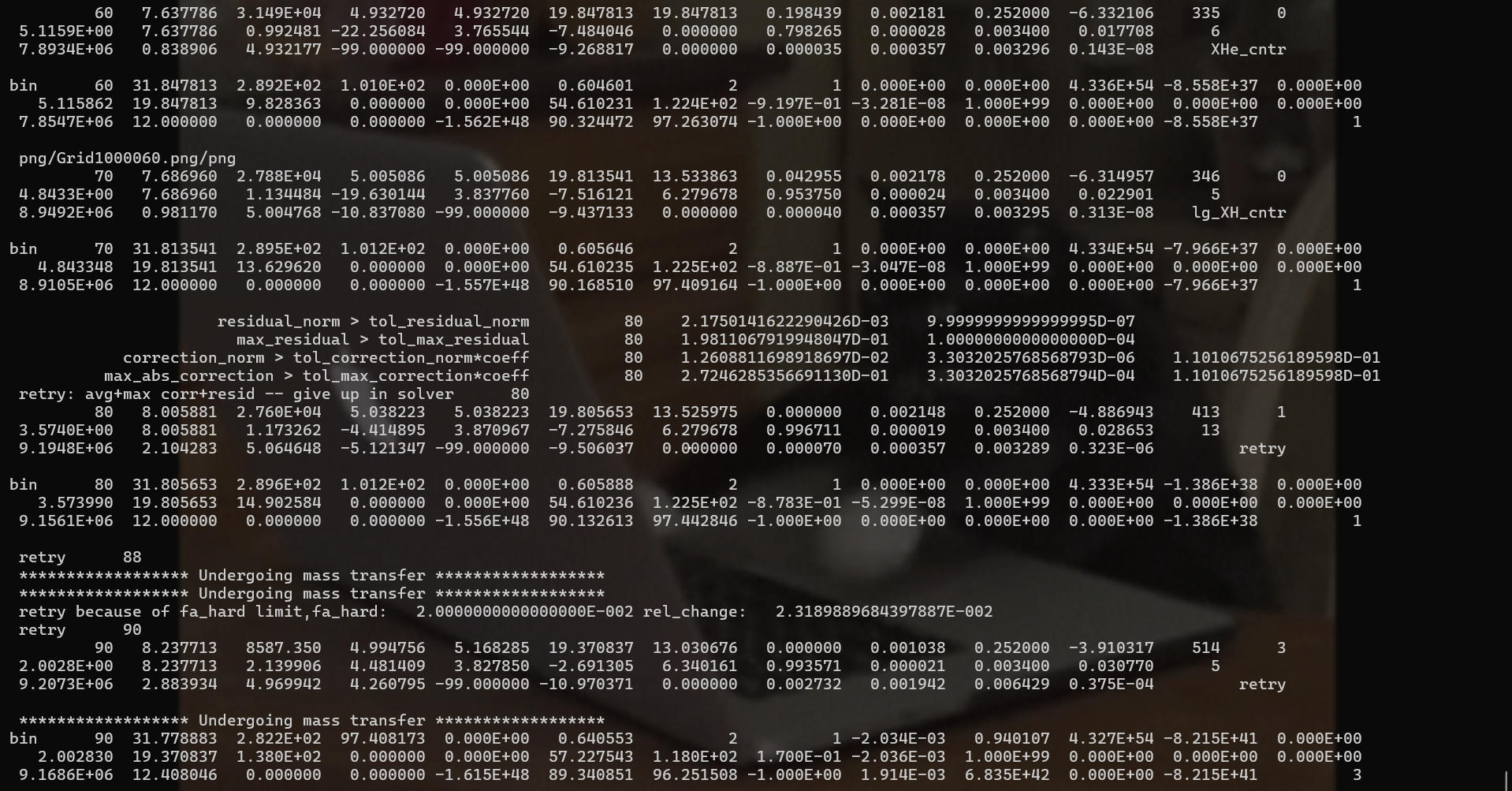
Fig. 2: The terminal output would look like this.
This run should end with the following terminal output:
 *********************************************
 **** Terminated at core carbon depletion ****
 *********************************************
Task 1.2. Which evolutionary phase is the primary in?
As a next step, we want to determine the current evolutionary phase of the primary star. Typically, core hydrogen burning is considered complete when the central hydrogen abundance drops below 1e-6, and core helium burning ends when the central helium abundance drops below 1e-6. Now, add conditions to !!! TASK 1 block !!! to identify which evolutionary state the primary star is in from the following list, and print it out:
- Core hydrogen burning
- Core helium burning
- Past core helium burning
Run the model and verify that the terminal output aligns with the results shown in the PGSTAR plot (abundance profiles in the upper middle panel)
Warning
Don’t forget to do ./clean and ./mk after modifying the run_binary_extras.f90 file.
Hint 1.2
b% s1% center_h1) and helium (b% s1% center_he4) to determine the current evolutionary phase. The conditions should involve checking whether the hydrogen/helium mass fractions are above or below 1e-6. Check how core carbon depletion is captured in the !!! HINT block !!! in run_binary_extras.f90.Solution 1.2
         !!! TASK 1 block begins !!!
         if (abs(b% mtransfer_rate)/Msun*secyer > 1d-10) then
             write(*,*) '****************** Undergoing mass transfer ******************'
         end if

         if (b% s1% center_h1 > 1e-6) then
             write(*,*) '****************** Core hydrogen burning ******************'
         else if ((b% s1% center_he4 > 1e-6) .and. (b% s1% center_h1 < 1e-6)) then
             write(*,*) '****************** Core helium burning ******************'
         else if (b% s1% center_he4 < 1e-6) then
             write(*,*) '****************** Past core helium burning ******************'
         end if
         !!! TASK 1 block ends !!!
Task 1.3. Print out Case A / B / C
As a last step, we want to print out in the terminal which mass transfer case is occurring whenever mass transfer takes place. Comment out the previous code in the !!! TASK 1 block !!! and implement new if-else statements that print “Case A,” “Case B,” or “Case C” depending on the evolutionary phase of the primary (according to the definitions listed at the start of Task 1). After making changes, run your model. Can you determine which mass transfer case your model undergoes? If you miss the terminal output during the run, you can review the out.txt file to see the printed messages.
Warning
Don’t forget to do ./clean and ./mk after modifying the run_binary_extras.f90 file.
If-else statements to print out Case A/B/C?Hint 1.3 (1)
         !!! TASK 1 block begins !!!
!         if (abs(b% mtransfer_rate)/Msun*secyer > 1d-10) then
!             write(*,*) '****************** Undergoing mass transfer ******************'
!         end if

!         if (b% s1% center_h1 > 1e-6) then
!             write(*,*) '****************** Core hydrogen burning ******************'
!         else if ((b% s1% center_he4 > 1e-6) .and. (b% s1% center_h1 < 1e-6)) then
!             write(*,*) '****************** Core helium burning ******************'
!         else if (b% s1% center_he4 < 1e-6) then
!             write(*,*) '****************** Past core helium burning ******************'
!         end if

         if (Condition for Case A event) then
             write(*,*) '****************** Case A ******************'
         else if (Condition for Case B event) then
             write(*,*) '****************** Case B ******************'
         else if (Condition for Case C event) then
             write(*,*) '****************** Case C ******************'
         end if
         !!! TASK 1 block ends !!!
Condition for Case A event?Hint 1.3 (2)
(b% s1% center_h1 > 1d-6) .and. (abs(b% mtransfer_rate)/Msun*secyer > 1d-10)
Condition for Case B event?Hint 1.3 (3)
(b% s1% center_h1 < 1d-6) .and. (b% s1% center_he4 > 1d-6) .and. (abs(b% mtransfer_rate)/Msun*secyer > 1d-10)
Condition for Case C event?Hint 1.3 (4)
(b% s1% center_he4 < 1d-6) .and. (abs(b% mtransfer_rate)/Msun*secyer > 1d-10)
Solution 1.3
         !!! TASK 1 block begins !!!
!         if (abs(b% mtransfer_rate)/Msun*secyer > 1d-10) then
!             write(*,*) '****************** Undergoing mass transfer ******************'
!         end if

!         if (b% s1% center_h1 > 1e-6) then
!             write(*,*) '****************** Core hydrogen burning ******************'
!         else if ((b% s1% center_he4 > 1e-6) .and. (b% s1% center_h1 < 1e-6)) then
!             write(*,*) '****************** Core helium burning ******************'
!         else if (b% s1% center_he4 < 1e-6) then
!             write(*,*) '****************** Past core helium burning ******************'
!         end if

         if ((b% s1% center_h1 > 1d-6) .and. (abs(b% mtransfer_rate)/Msun*secyer > 1d-10)) then
             write(*,*) '****************** Case A ******************'
         else if ((b% s1% center_h1 < 1d-6) .and. (b% s1% center_he4 > 1d-6) .and. (abs(b% mtransfer_rate)/Msun*secyer > 1d-10)) then
             write(*,*) '****************** Case B ******************'
         else if ((b% s1% center_he4 < 1d-6) .and. (abs(b% mtransfer_rate)/Msun*secyer > 1d-10)) then
             write(*,*) '****************** Case C ******************'
         end if
         !!! TASK 1 block ends !!!
Bonus exercise:
Can you print out which mass transfer cases a binary system undergoes throughout its evolution at the end of the run? Try to capture all the cases. For example, Case A mass transfer is generally followed by Case B mass transfer. In this case, we want to print out “Case A + B” at termination.
Tip
Got stuck during the lab? Do not worry! You can always download solution from here ⬇ Download to catch up!
Task 2. Determine mass transfer stability
In some cases, mass transfer becomes unstable, leading the binary to enter a common-envelope phase. Run a binary model with an initial primary mass of 20 Msun, an initial secondary mass of 6 Msun, and an initial orbital period of 5 days by modifying inlist_extra. What do you see in the screen output and in the PGSTAR plot? Can you identify which parameter is changing significantly (hint: focus on the right-hand panel of the grid PGPLOT)? What is happening to the timesteps, and can you explain why?
Stop the run manually by Ctrl+C when the model number reaches ~150.
One way to detect this instability is to check the mass transfer rate and the timestep. If the mass transfer rate is high (greater than Msun/yr) and the timestep becomes very small (less than 0.1 years), it is an indication that unstable mass transfer has started.
Write a code to terminate the run when unstable mass transfer sets in, and make MESA print “Terminated due to unstable mass transfer” in the terminal. One parameter that you will use is again b% mtransfer_rate (mass transfer rate in g/s, negative). The other parameter, which corresponds to the timestep, search for it in $MESA_DIR/star_data/public/star_data.inc. Then write a script using the two parameters in !!! TASK 2 block begins !!!. If the mass transfer was stable or there was no mass transfer, the run will end with the printout “Terminated due to core carbon depletion” in the terminal (which is already implemented in the !!! HINT block !!!).
If it took too long to reach this point (over ~20 mins), you can get the solution and proceed to Task 3.
Warning
Don’t forget to do ./clean and ./mk after modifying the run_binary_extras.f90 file.
Hint 2
extras_binary_finish_step = terminate at the right place. Check how to terminate the MESA run in the !!! HINT block !!! in run_binary_extras.f90.Solution 2
         !!!!! TASK 2 block begins !!!
         if ((abs(b% mtransfer_rate)/Msun*secyer > 1d-3) .and. (b% s1% dt/secyer < 0.1)) then
             write(*,*) '**********************************************'
             write(*,*) '** Terminated due to unstable mass transfer **'
             write(*,*) '**********************************************'
             extras_binary_finish_step = terminate
         end if
         !!!!! TASK 2 block ends !!!
Tip
Got stuck during the lab? Do not worry! You can always download solution from here ⬇ Download to catch up!
Task 3. Run a model with random initial binary parameters
Now, we will explore different mass transfer cases and their stability across the initial binary parameter space. We will fix an initial primary mass to 20 Msun. Choose a random pair of initial mass ratio and an initial orbital period from the “P-q diagram” sheet in the following Google Spreadsheet, and put your name in the corresponding column of this Google spreadsheet (local copy), and perform MESA run with the corresponding initial parameters. If you have many cores on your laptop (more than approx. 6), you can choose the ones with high initial orbital periods (>2000 days). You need to modify “inlist_extra” to use new initial binary parameters.
Tip
You can check the number of cores via:
grep -c ^processor /proc/cpuinfo       (in terminal for Linux)
echo %NUMBER_OF_PROCESSORS%            (in CMD for Windows)
sysctl hw.ncpu                         (in terminal for macOS)
Observe the terminal output to check the case of the mass transfer when mass transfer begins (this is because Case A is always followed by Case B). If you missed it, again, you can do
grep -ir Case out.txtto print out the occurrences of the string “Case” from the out.txt file. Record your results in the “P-q diagram” sheet in the Google Spreadsheet.
Important
Parameters to Enter:
Case: One of A, B, or C.
Stable: Enter y for stable mass transfer or n if terminated due to unstable mass transfer.
If there was no mass transfer, leave Case and Stable blank.
Bonus exercise:
Here, you are asked to run one model.
If you complete this task quickly, feel free to select additional initial binary parameter pairs and run more models.
You may also choose an initial mass ratio and an initial orbital period different from those provided in the sheet.
(If you do so, please append your values as a new row at the end of the table.)
Note
Once several participants will have added their obtained values, a pattern will emerge in the initial orbital period-mass ratio (P-q) diagram.
- Where do Case A, B, and C systems appear on the P–q diagram, and why?
- How does the initial mass ratio influence the stability of mass transfer, and why?
- Do you observe any other interesting patterns? What might be the reasons behind them?
Discuss these questions with your group members.
Task 4 (Bonus): Visualizing the effect of binary evolution with TULIPS
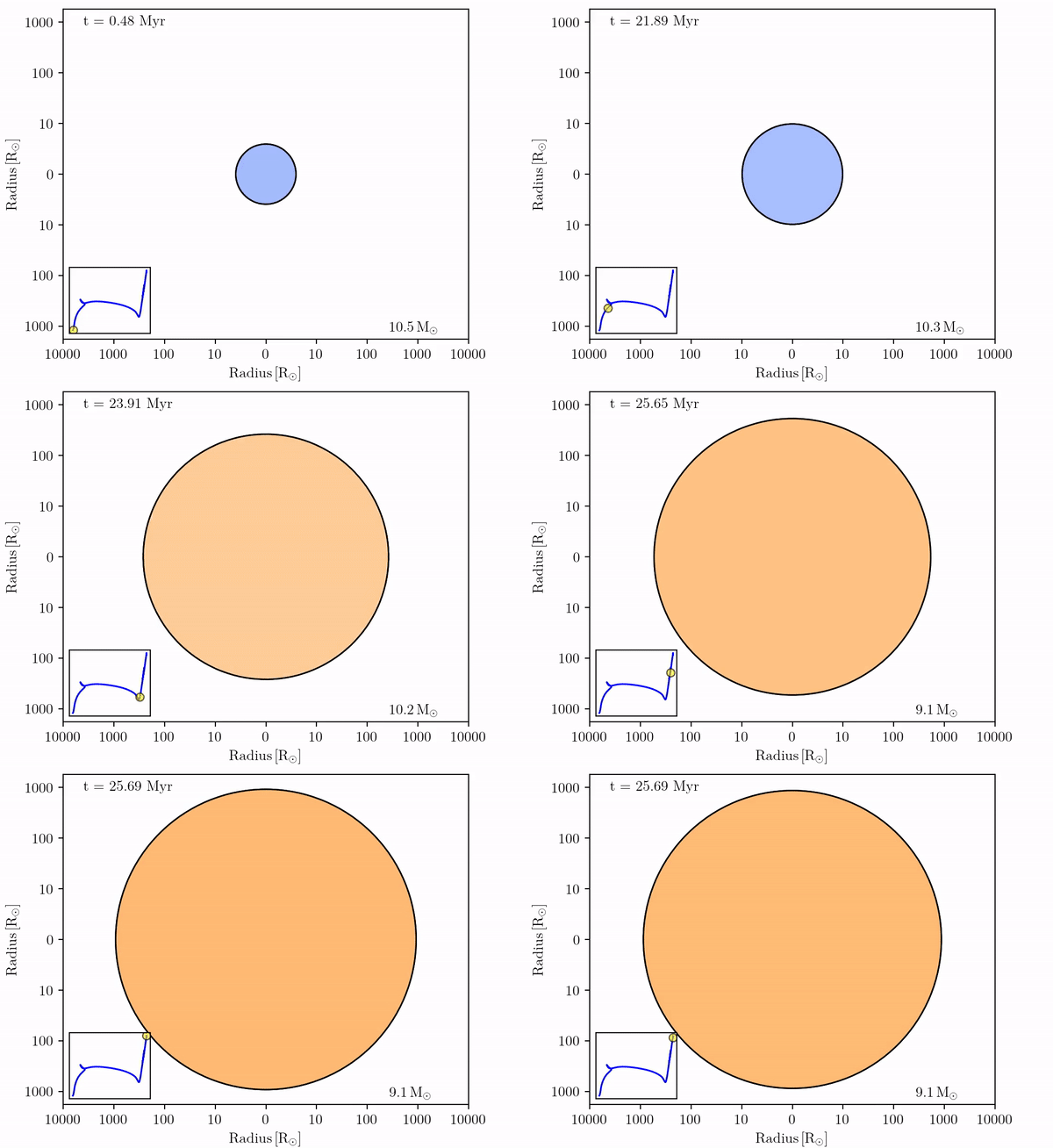
We can look at the outcome of binary evolution in more detail by visualizing our simulation results with TULIPS, a Python package for stellar evolution visualization. We will create movies of the changes in the properties of a donor and accretor in a binary system pre-computed with MESA. For this exercise, you will need to upload the contents of the LOGS1 and LOGS2 output directories found ⬇ here into this Google Collab notebook
(local copy)
.
Solutions can be found in this Google collab notebook (local copy) .
Warning
The settings used in this lab are intended for educational purposes and are not suitable for scientific research. To reduce computation time, we use very coarse spatial and temporal resolutions. Scientific research requires much higher resolutions, and they should be tested.
Acknowledgement
The MESA input files were built upon the following resource:
https://wwwmpa.mpa-garching.mpg.de/~jklencki/html/massive_binaries.html