Late massive star evolution: physics challenges to numerics
Minilab 1
Massive star models become numerically more challenging as they evolve. Issues manifest as plummeting timesteps below any threshold. Broadly speaking, these issues can be seeded in either “the core” (where nuclear burning of heavier elements stiffens the equations) and/or “the envelope” (where small timesteps result in waves and occasionally spurious artificial accelerations, convection can be inefficient and density inversions occur, see Paxton et al. 2013, Jermyn et al. 2023). Each kind of issues can also interact non-linearly with the other, resulting in the majority of a grid crashing.
Note: this is not exclusively a “MESA” problem, but a result of the physics being described by progressively stiffer equations that are numerically more challenging to solve and require smaller timesteps. This is why most (but notably not all) stellar evolution codes stop at C core depletion at the latest.
The starting point
Task 1: Download the 15Msun_problem folder from gitHub.
Hint. Click on it to reveal it.
Download from git the repo for this lecture and get into the folder
with the following bash one-liner (Note: && is a bash “and”, which
will execute the second command only if the first exits successfully):
git clone https://github.com/mathren/mesa25_best_practices.git && cd mesa25_best_practices/15Msun_problemOr download a zip file.
We will use a simple model of a 15M☉ star (see the work directory you downloaded) to
illustrate these problems. In the interest of speed, we will use a
22-isotope network and we have already evolved it beyond carbon core
depletion (model number 1261).
Note: If you are interested in creating pre-SN models to study whether stars explode or not (and with what energies), you want to properly capture the free electron profile, which determines the effective Chandrasekhar mass of the core and thus its structure. Specifically, you want your results to be robust against adding more isotopes in your nuclear reaction network. For this, you need at least ∼80 isotopes (e.g., Farmer et al. 2016, Renzo et al. 2024, Grichener et al. 2025). If you are interested in the nuclear neutrino luminosities, for example for SN precursor alerts, you need at least ∼200 (e.g., Kato et al. 2020, Farag et al. 2020). If your science doesn’t depend on the core structure, you may get away with small nuclear reaction networks.
You can inspect the pgstar
movie to see your initial
conditions, which can be reproduced re-running inlist_early_evol.
Ideally, we want to be able to run this to the onset of core collapse, but again for summer school purposes, let’s just try to get beyond oxygen depletion and call it a success.
Note: min_timestep_limit is set to 1 seconds, too high for
production models past O core burning, but it’s sufficiently low that
one may not want to continue the evolution in testing, and in this
particular case, we have tested that blindly lowering the
min_timestep_limit down to 1d-20 will not bypass this issue.
Common situation: Running into a problem
Task 2: After initializing MESA and running ./clean && ./mk start from
the provided photo (photos/x261).
Hint. Click on it to reveal it.
./re will restart from the last photo saved on the
disk, which should still be x261, and you can use the command line
touch to update the time of last edit of a photo to trick MESA. We
have modified the ./rn bash script to add an extra check in case you
really want to start from the beginning. This is not something you
should do during this lab.The main inlist points to inlist_problem which is at this point is the
same as inlist_early_evol (use to create the pre-computed initial
conditions) except for the stopping criterion.
Note: It’s not exactly a bare-bone model, but definitely not science-ready!
Watch your model evolve. The terminal output is often the quickest way
to get an idea of what’s going on, but it may scroll too fast to look
at it. You can pause (without killing) the run with Ctrl-Z and resume
it typing fg.
At model 1266 you should hit the hydro_failed condition.
At this point, for an individual model one may fiddle a bit to find a
work-around (e.g., fiddling with increasing resolution, decreasing
min_timestep_limit), but that can often become a messy random walk in
the forest of MESA parameters. Sometimes, a problem cannot be worked
around and needs to be fixed.
But what is the problem?
The terminal output indicates that MESA took a series of retries
before hitting hydro_failed.
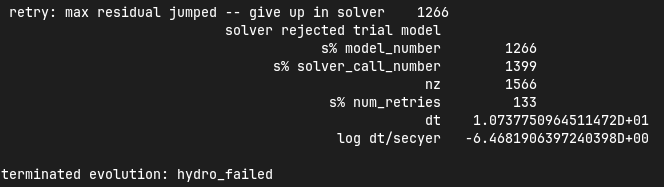
The output also says that there has been 133 of these retry, (not all
at this specific timestep though). A retry means that the proposed
solution of the ODEs you are solving is not good enough (left and
right hand-side still differ too much, the difference is called
residual), prompting MESA to retry from the initial conditions of the
previous timestep with a smaller timestep size.
Another useful information is the value of s% solver_call_number, in
this case 1399, which differs from the model number (here 1266)
precisely because of the retries. This is the call to the solver that
resulted in the hydro_failed.
Let’s collect more output about this.
MESA’s debugging output
We will instruct MESA to provide debugging output we don’t normally
want to see. To do this we will use a particular set of controls in
out inlist, which are described in the MESA documentation at
$MESA_DIR/star/defaults/controls.defaults/ or online, and also
collected for convenience in
$MESA_DIR/star/test_suite/debugging_stuff_for_inlists. Don’t worry, we
won’t need to use all of this!
Task 3a (optional): Copy the content of this file in your
inlist_problem in the controls namelist (or “section”). Everything is
commented (! in Fortran 90, used also in the inlists which are not
proper Fortran files).
Task 3b: Uncomment and set to .true. the report_solver_progress
control and restart the run again.
Hint. Click on it to reveal it.
The line you need to add to your controls namelist is the following:
report_solver_progress = .true.and then ./re to restart.
The run now produces more output per timestep, and thus scrolls faster
(but you can still pause it with Ctrl-Z, restart with fg), but apart
from that we haven’t changed anything and it should crash in the same
way.
The solver call that crashes shows this:
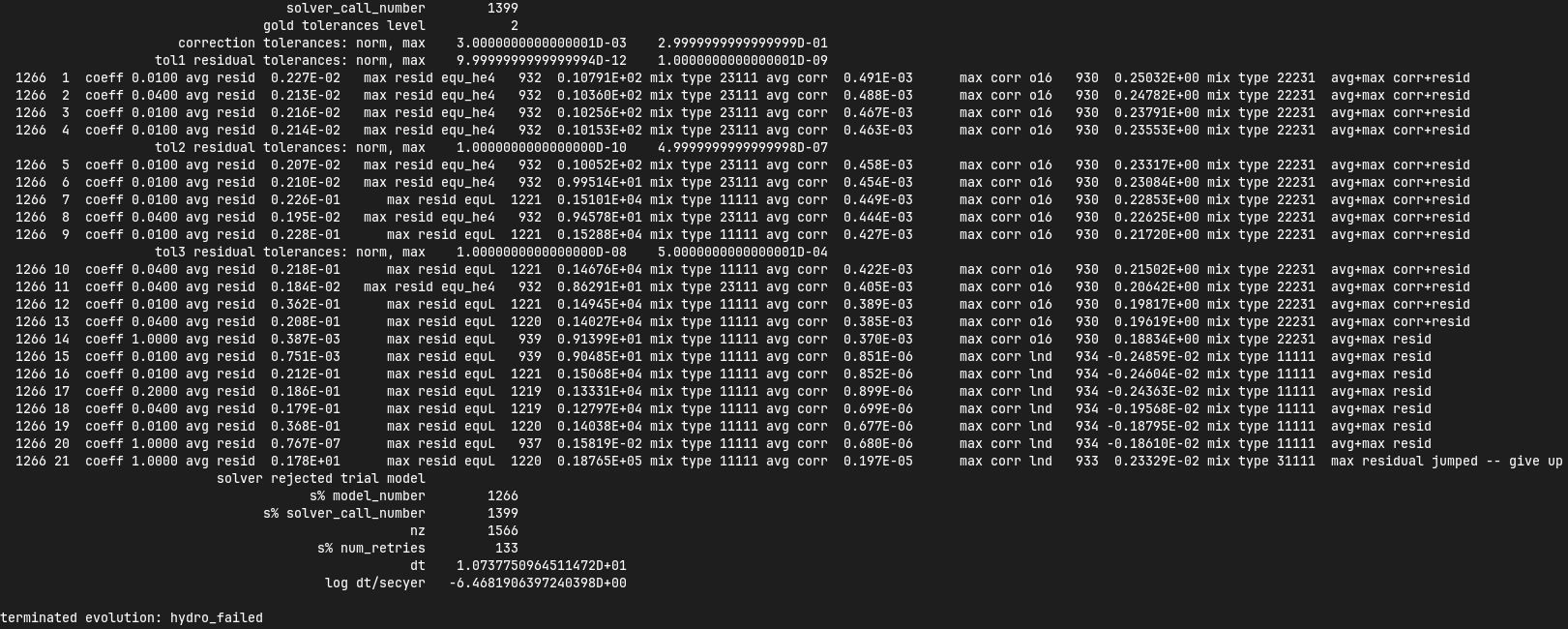
Which is described in the MESA documentation here. After a line
declaring the current solver call number (1399), which “gold”
tolerance level we are applying, the reporting on each solver
iteration starts.
The line starting with tol1 tells the level of tolerances currently
applied, if no solution can be found, this is relaxed to tol2 and
later tol3 after a set of user-specified number of solver iterations.
For the lines produced at each iteration, the first column says the
current timestep (1266), the second shows the solver iteration number
for the current call (1, 2, …). The most important things for us are
the column containing equ-something and the column following max corr.
equ is the name that MESA gives to the residuals, as you can verify
checking the definitions in $MESA_DIR/star_data/public/. This is the
place where all variables available to MESA are defined.
Task 4: Using grep (or similar tools) you can look for equ here and
see if anything useful comes up, you should find something to help you
understand what this is.
If you don’t know where to start, you can grep the entire $MESA_DIR
directory, but it’s more work to weed out output you don’t need.
Hint. Click on it to reveal it.
This is the bash command I used and the result for me:
grep -R "equ" $MESA_DIR/star_data/public/*Which produces this output:
star_data/public/star_data_step_input.inc:      ! flags indicating extra variables and equations in addition to the minimal set
star_data/public/star_data_step_input.inc:      ! index definitions for the equations (= 0 if equation not in use)
star_data/public/star_data_step_input.inc:         integer :: i_equL ! luminosity
star_data/public/star_data_step_input.inc:         integer :: i_detrb_dt ! turbulent energy equation. only when RSP2_flag is true.
star_data/public/star_data_step_input.inc:         integer :: i_equ_Hp ! face pressure scale height equation. only when RSP2_flag is true.
star_data/public/star_data_step_input.inc:      ! names of variables and equations
star_data/public/star_data_step_input.inc:         character (len=name_len), dimension(:), pointer :: nameofvar, nameofequ ! (nvar)
star_data/public/star_data_step_input.inc:         ! 900 million different sequences. the state of the generator (for restarts)
star_data/public/star_data_step_input.inc:         integer :: i_equ_w_div_wc ! equation for w_div_wc
star_data/public/star_data_step_input.inc:         integer :: i_dj_rot_dt ! equation for specific angular momentum
star_data/public/star_data_def.inc:      ! 900 million different sequences. the state of the generator (for restarts)
star_data/public/star_data_def.inc:               id, nz, xm, r, rho, aw, ft, fp, r_polar, r_equatorial, report_ierr, ierr)
star_data/public/star_data_def.inc:            real(dp), intent(inout) :: r_polar(:), r_equatorial(:)
star_data/public/star_data_def.f90:         ! gfortran seems to require "save" here.  at least it did once upon a time.
star_data/public/star_data_step_work.inc:      ! eos partials for use in calculating equation partials for Jacobian matrix
star_data/public/star_data_step_work.inc:      real(dp), pointer :: w_div_w_crit_roche(:) ! fraction of critical rotation at the equator,
star_data/public/star_data_step_work.inc:      real(dp), pointer :: r_equatorial(:) ! radius in equatorial direction
star_data/public/star_data_step_work.inc:      ! extra gravity (can be set by user)  added to -G*m/r^2 in momentum equation
star_data/public/star_data_step_work.inc:         surf_r_equatorial, surf_csound, surf_rho
star_data/public/star_data_step_work.inc:            ! equivalently, this is the smallest k st. for all k' > k,
star_data/public/star_data_step_work.inc:      ! equation residuals, etc
star_data/public/star_data_step_work.inc:         ! equ(i,k) is residual for equation i of cell k
star_data/public/star_data_step_work.inc:         real(dp), dimension(:,:), pointer :: equ=>null() ! (nvar,nz);  equ => equ1
star_data/public/star_data_step_work.inc:         real(dp), dimension(:), allocatable :: equ1 ! (nvar*nz); data for equ
star_data/public/star_data_step_work.inc:         ! dblk(i,j,k) = dequ(i,k)/dx(j,k)
star_data/public/star_data_step_work.inc:         ! lblk(i,j,k) = dequ(i,k)/dx(j,k-1)
star_data/public/star_data_step_work.inc:         ! ublk(i,j,k) = dequ(i,k)/dx(j,k+1)
Specifically, the 5th line from the bottom shows that equ is an array
of dimensions (nvar, nz) where nvar is the number of variables (
, ….) and nz is the number of zones. The line just above shows
a comment that suggests this is indeed the array of residuals.
Thus, the equ column tells us which residual is largest for the
proposed and rejected solution:, in this case initially it’s equ_he4
at iteration 1 of the solver, it can change at every iteration, until
at the end it is equL. This is the thing that is making our model
crash. Moreover, scrolling upward through the solver iterations we see
that the residual (4th but last column) is jumping from negative to
positive from iteration 20 to iteration 21. Finally, during these
iterations, lnd (that is, physically, the density) is the problematic
variable. At each iteration of the solver (shown as a line here), MESA is
searching for a solution with a Generalized Newton-Raphson solver (see
sec. 6.3 of Paxton et al. 2011): the iterative corrections to an
initial guess (the solution of the previous timestep) depend on the
derivatives of the residuals with respect to the variables (see excellent
wikipedia gif for intuition on this).
Note: Unless the timestep is too small, the initial guess is usually not a good solution in many different ways, and which residual is initially largest among many too large values is not particularly important. The lines with the latest solver iterations are the most important here.
So the correct way to interpret this output is that the equation equL
cannot be satisfied within the defined numerical tolerances of the
Newton-Raphson solver. This in general can occur because of multiple
reason (and potentially requiring different fixes/work-arounds), for
example:
- an assumption of the equation is violated (⇒ maybe you want to
reformulate the equation differently, often there are options
already available in MESA or you can implement your own with
run_star_extras.f90) - too large numerical errors introduced in the discretization (⇒ remeshing before the problem arise can help)
- One or more inputs or parameters of the equation are too noisy (⇒ you may need to remesh based on a quantity different than the one calculated by the problematic equation).
Moreover, the terminal output also shows that the residual equL has a
bad derivative with respect to the variable dens in the last line.
But what is the equation for which the residual is equL? One would
naively assume a luminosity equation given the name! However, in MESA
the luminosity is a solver variable and there isn’t really a
“luminosity equation” (except for the local energy conservation).
Task 5: Let’s use tools such grep to inspect the code to find out what
equL may be.
Hint. Click on it to reveal it.
This is a one liner to find all the instances of equL in the folder
MESA_DIR, regardless of capitalization (-I option, Fortran 90 doesn’t
care!) and recursively (-R option) including only *.f90 files
(--include option):
grep -IR --include="*.f90" "equL" $MESA_DIRWhich produces this output:
$MESA_DIR/star/private/hydro_temperature.f90:         integer :: i_equL, i
$MESA_DIR/star/private/hydro_temperature.f90:         i_equL = s% i_equL
$MESA_DIR/star/private/hydro_temperature.f90:         if (i_equL == 0) return
$MESA_DIR/star/private/hydro_temperature.f90:         s% equ(i_equL, k) = resid%val
$MESA_DIR/star/private/hydro_temperature.f90:            s, k, nvar, i_equL, resid, 'do1_alt_dlnT_dm_eqn', ierr)
$MESA_DIR/star/private/hydro_temperature.f90:         integer :: i_equL
$MESA_DIR/star/private/hydro_temperature.f90:         i_equL = s% i_equL
$MESA_DIR/star/private/hydro_temperature.f90:         if (i_equL == 0) return
$MESA_DIR/star/private/hydro_temperature.f90:         s% equ(i_equL, k) = resid%val
$MESA_DIR/star/private/hydro_temperature.f90:         if (is_bad(s% equ(i_equL, k))) then
$MESA_DIR/star/private/hydro_temperature.f90:            if (s% report_ierr) write(*,2) 'equ(i_equL, k)', k, s% equ(i_equL, k)
$MESA_DIR/star/private/hydro_temperature.f90:            write(*,2) 'equ(i_equL, k)', k, s% equ(i_equL, k)
$MESA_DIR/star/private/hydro_temperature.f90:            s% solver_test_partials_val = s% equ(i_equL,k)
$MESA_DIR/star/private/hydro_temperature.f90:            s, k, nvar, i_equL, resid, 'do1_gradT_eqn', ierr)
$MESA_DIR/star/private/hydro_temperature.f90:         integer :: i_equL
$MESA_DIR/star/private/hydro_temperature.f90:         i_equL = s% i_equL
$MESA_DIR/star/private/hydro_temperature.f90:         if (i_equL == 0) return
$MESA_DIR/star/private/hydro_temperature.f90:         s% equ(i_equL, k) = resid%val
$MESA_DIR/star/private/hydro_temperature.f90:         if (is_bad(s% equ(i_equL, k))) then
$MESA_DIR/star/private/hydro_temperature.f90:            if (s% report_ierr) write(*,2) 'equ(i_equL, k)', k, s% equ(i_equL, k)
$MESA_DIR/star/private/hydro_temperature.f90:            write(*,2) 'equ(i_equL, k)', k, s% equ(i_equL, k)
$MESA_DIR/star/private/hydro_temperature.f90:            call mesa_error(__FILE__,__LINE__,'i_equL')
$MESA_DIR/star/private/hydro_temperature.f90:            s% solver_test_partials_val = s% equ(i_equL,k)
$MESA_DIR/star/private/hydro_temperature.f90:            s, k, nvar, i_equL, resid, 'do1_dlnT_dm_eqn', ierr)
$MESA_DIR/star/private/hydro_eqns.f90:            i_dv_dt, i_du_dt, i_du_dk, i_equL, i_dlnd_dt, i_dlnE_dt, i_dlnR_dt, &
$MESA_DIR/star/private/hydro_eqns.f90:            do_alpha_RTI, do_w_div_wc, do_j_rot, do_dlnE_dt, do_equL, do_detrb_dt
$MESA_DIR/star/private/hydro_eqns.f90:         do_equL = (i_equL > 0 .and. i_equL <= nvar)
$MESA_DIR/star/private/hydro_eqns.f90:            if (do_equL) then
$MESA_DIR/star/private/hydro_eqns.f90:            call PT_eqns_surf(s, nvar, do_du_dt, do_dv_dt, do_equL, ierr)
$MESA_DIR/star/private/hydro_eqns.f90:            i_equL = s% i_equL
$MESA_DIR/star/private/hydro_eqns.f90:      subroutine PT_eqns_surf(s, nvar, do_du_dt, do_dv_dt, do_equL, ierr)
$MESA_DIR/star/private/hydro_eqns.f90:         logical, intent(in) :: do_du_dt, do_dv_dt, do_equL
$MESA_DIR/star/private/hydro_eqns.f90:         if ((.not. do_equL) .or. &
$MESA_DIR/star/private/hydro_eqns.f90:            s% equ(s% i_equL, 1) = residual
$MESA_DIR/star/private/hydro_eqns.f90:               s, 1, nvar, s% i_equL, resid_ad, 'set_Tsurf_BC', ierr)
$MESA_DIR/star/private/alloc.f90:            s% i_equL = s% i_lum
$MESA_DIR/star/private/alloc.f90:            s% i_equL = s% i_lnd
$MESA_DIR/star/private/alloc.f90:         if (s% i_equL /= 0) s% nameofequ(s% i_equL) = 'equL'
$MESA_DIR/star/private/photo_in.f90:            s% i_dv_dt, s% i_equL, s% i_dlnd_dt, s% i_dlnE_dt, &
$MESA_DIR/star/private/init.f90:         s% i_equL = 0
$MESA_DIR/star/private/ctrls_io.f90:    include_rotation_in_total_energy, convergence_ignore_equL_residuals, convergence_ignore_alpha_RTI_residuals, &
$MESA_DIR/star/private/ctrls_io.f90: s% convergence_ignore_equL_residuals = convergence_ignore_equL_residuals
$MESA_DIR/star/private/ctrls_io.f90: convergence_ignore_equL_residuals = s% convergence_ignore_equL_residuals
$MESA_DIR/star/private/hydro_rsp2.f90:         s% equ(s% i_equL, k) = residual
$MESA_DIR/star/private/hydro_rsp2.f90:         call save_eqn_residual_info(s, k, nvar, s% i_equL, resid, 'do1_rsp2_L_eqn', ierr)
$MESA_DIR/star/private/photo_out.f90:            s% i_dv_dt, s% i_equL, s% i_dlnd_dt, s% i_dlnE_dt, &
$MESA_DIR/star/private/solver_support.f90:         if (s% convergence_ignore_equL_residuals) skip_eqn1 = s% i_equL
It looks like it appears in the file
$MESA_DIR/star/private/hydro_temperature.f90 (among others).
In fact, equL is a short hand for s%equ(i_equL, :) which is assigned
in $MESA_DIR/star/private/hydro_temperature.f90 at line 274 by this
snippet:
gradT = s% gradT_ad(k)
dlnTdm = dlnPdm*gradT

Tm1 = wrap_T_m1(s,k)
T00 = wrap_T_00(s,k)
dT = Tm1 - T00
alfa = s% dm(k-1)/(s% dm(k-1) + s% dm(k))
Tpoint = alfa*T00 + (1d0 - alfa)*Tm1
lnTdiff = dT/Tpoint ! use this in place of lnT(k-1)-lnT(k)
delm = (s% dm(k) + s% dm(k-1))/2

resid = delm*dlnTdm - lnTdiff
s% equ(i_equL, k) = resid%val
which suggests that equL is the residual of the temperature gradient
equation, not a (non-existing) luminosity equation. See also Paxton et
al. 2011 Sec. 6.2 (specifically Eq. 8).
Why this name then? In a star, the temperature gradient will adjust to
carry the luminosity (leading to convection if the radiative gradient
is insufficient). So we can use the temperature gradient to calculate
luminosity. However, it is numerically convenient to flip things, and
use the luminosity to calculate the temperature gradient instead:
ultimately equL is about the luminosity, but the equation it is the
residual of is the temperature gradient equation.
Optional: confirming the bad term
To confirm that it is the derivative of the residual equL with respect to
the density lnd is behaving bad, let’s get some info about those
by uncommenting and setting in our inlist the following:
solver_test_partials_call_number = 1399
solver_test_partials_iter_number = 21
solver_test_partials_k = 21
solver_test_partials_equ_name = 'equL'
solver_test_partials_var_name = 'lnd'
solver_test_partials_dx_0 = 1d-5
Note: At this stage you may also want to set
solver_save_photo_call_number equal to the solver call of the problem
(in our case 1399) so MESA will save a photo just before this solver
call, saving you time to debug.
This tells MESA we want more output at solver call number 1399, we
want to inspect the 21 iteration of the solver, and we want to see
the partial derivatives of the luminosity equation with respect to
lnd. This will also make MESA crash right after that iteration of
the solver: you will need to undo these changes to continue. Scroll
up (or re-run) to see the output:

which confirms that the suspected partial derivative is the culprit of
the problem, specifically the line with **** indicates the worse
term.
So this is the (first) problem!
The derivative of the residual of the equation for the temperature
gradient, a.k.a. equL with respect to the variable lnd, the density is causing
flip-flopping large corrections to the trial solution and preventing
the solver from finding a satisfying solution. This suggest the
calculation of this derivative is too imprecise – this may not
advance us so much, but at least we know which equation is giving us
numerical troubles!
Note: Sometimes it easier to spot problems making plots, or staring at
pgstar. The technique illustrated here is a last resort when
plotting and physical plus numerical intuition are not enough to get out of
a hole.
Note: This technique is general and can be used for any model crashing. Once you’ve identified the problem, the solution will typically need to be tailored to that specific problem.
Finding a solution
There may be more than one! This is where computing stellar structure and evolution models is a bit of an art: experience from trial-and-error and many wasted CPUh is the best way to become proficient at finding solutions and/or work-arounds.
Since the problem is in equL, one naive thing one can do is to ignore
the residuals of those equation. In fact, there is a controls flag to
do this in MESA: this suggests this is a common enough problem!
Task 6: Find the flag that may help us and add it to inlist_problem (and
maybe remove the debug options we previously activated to reduce I/O).
Then restart the run.
Hint. Click on it to reveal it.
$MESA_DIR/star/defaults/controls.defaults or in the
online documentation to see if you find a suitable flag.Hint. Click on it to reveal it.
grep, similar tools, or your text
editor) for convergence_ignore to find suitable optionsHint. Click on it to reveal it.
Try adding this to the controls namelist of your inlist:
convergence_ignore_equL_residuals = .true.This is of course not an elegant solution to be used with extra care only if acceptable for your scientific purposes.
However, note that the test suite for massive stars does use it! See
for example
$MESA_DIR/star/test_suite/20M_pre_ms_to_core_collapse/inlist_common!
Even worse, if you search in the test_suite for
convergence_ignore_equL_residuals, you will find many more instances
of this setting being used! Are we giving up on solving the energy
transport/temperature gradient equation all these times?
Task 7: find all instances of the controls setting in the
$MESA_DIR/star/test_suite
Hint. Click on it to reveal it.
Below is a one-liner that you can use from anywhere in your terminal
to get the output above assuming MESA_DIR is initialized. It will go
to the test_suite directory then (after &&), use grep to look for the
string in between quotes recursively (-R), and the lastly go back to
the previous folder where you were (cd -):
cd $MESA_DIR/star/test_suite && grep -R "convergence_ignore_equL_residuals = .true." ./* && cd -Which gives me:
./12M_pre_ms_to_core_collapse/inlist_common:      convergence_ignore_equL_residuals = .true.
./1.5M_with_diffusion/inlist_1.5M_with_diffusion:   convergence_ignore_equL_residuals = .true.
./1M_pre_ms_to_wd/inlist_to_end_core_he_burn:      convergence_ignore_equL_residuals = .true.
./20M_pre_ms_to_core_collapse/inlist_common:      convergence_ignore_equL_residuals = .true.
./20M_z2m2_high_rotation/inlist_to_end_core_he_burn:      convergence_ignore_equL_residuals = .true.
./ccsn_IIp/inlist_infall:  convergence_ignore_equL_residuals = .true.
./ccsn_IIp/inlist_end_infall:  convergence_ignore_equL_residuals = .true.
./ccsn_IIp/inlist_edep:  convergence_ignore_equL_residuals = .true.
./ccsn_IIp/inlist_shock_common:      convergence_ignore_equL_residuals = .true.
./gyre_in_mesa_rsg/inlist_common_post_zams:   convergence_ignore_equL_residuals = .true.
./hb_2M/inlist_to_ZACHeB:      convergence_ignore_equL_residuals = .true. ! needed during flash
./irradiated_planet/inlist_evolve:      convergence_ignore_equL_residuals = .true.
./make_brown_dwarf/inlist_make_brown_dwarf:   convergence_ignore_equL_residuals = .true.
./make_co_wd/inlist_remove_env:      convergence_ignore_equL_residuals = .true.
./make_o_ne_wd/inlist_remove_envelope:      convergence_ignore_equL_residuals = .true.
./make_o_ne_wd/inlist_settle_envelope:      convergence_ignore_equL_residuals = .true.
./make_o_ne_wd/inlist_o_ne_wd:      convergence_ignore_equL_residuals = .true.
./make_planets/inlist_create:   convergence_ignore_equL_residuals = .true.
./make_pre_ccsn_13bvn/inlist_massive_defaults:      convergence_ignore_equL_residuals = .true.
./ns_c/inlist_to_c_flash:      convergence_ignore_equL_residuals = .true.
./pisn/inlist_common_converted:      convergence_ignore_equL_residuals = .true.
./pisn/inlist_common:      convergence_ignore_equL_residuals = .true.
./split_burn_big_net/inlist_common:      convergence_ignore_equL_residuals = .true.
./twin_studies/inlist_common:      convergence_ignore_equL_residuals = .true.
./tzo/inlist_initial_make:   convergence_ignore_equL_residuals = .true.
./tzo/inlist_evolve_tzo:      convergence_ignore_equL_residuals = .true.
./wd_acc_small_dm/inlist_wd_acc_small_dm:      convergence_ignore_equL_residuals = .true.
./wd_c_core_ignition/inlist_wd_c_core_ignition:      convergence_ignore_equL_residuals = .true.
./wd_nova_burst/inlist_wd_nova_burst:   convergence_ignore_equL_residuals = .true.
./wd_nova_burst/inlist_setup:   convergence_ignore_equL_residuals = .true.
In $MESA_DIR/star/private/hydro_temperature.f90, where we previously
found the definition of equL, we can see a useful comment:
! dT/dm = dP/dm * T/P * grad_T, grad_T = dlnT/dlnP from MLT.
! but use hydrostatic value for dP/dm in this.
! this is because of limitations of MLT for calculating grad_T.
! (MLT assumes hydrostatic equilibrium)
! see comment in K&W chpt 9.1.
So according to this, the equation we are trying to solve assumes
hydrostatic equilibrium because it implicitly relies on mixing
length theory (MLT) to get ∇ = gradt_T.
At the same time, most test cases where we find
convergence_ignore_equL_residuals = .true. seem to imply some
dynamical phase of evolution (massive stars going to core collapse,
flashes, etc.): if your model is not perfectly in hydrostatic
equilibrium, there is no reason to expect that this equation can be
solved perfectly, because one of its implicit assumptions is not
exactly verified.
This is what allows this “dirty trick” without having to throw away all the possible science!
Note: The fact that we ignore the residual in equL does not imply this
equation will necessarily not be satisfied, we are just telling the
solver that we are willing to accept solutions with large residual,
and we hope that the numerical tolerances on other quantities will
give a reasonable answer even if numerically not perfect.
If everything went well, the run should now proceed past model 1266:
you have successfully bypassed the problem! This model should continue
until Oxygen depletion (defined as
). Congratulations!
Bonus task 1: You can edit the stopping condition in your
inlist_problem to evolve past Oxygen depletion. You may also want to
decrease the min_timestep_limit to something smaller than 1 second. A
second crash should occur during Si core burning. You can use the
things you learned in this lab to find the problem and try to fix it.
Remember that the nuclear reaction network we are using here is
insufficient for science focusing on the core of evolved massive
stars!
Bonus task 2: Find an alternative possible solution by reformulating the problematic equation (Note: this is untested by us!). You probably don’t want to change which system of ODE you are solving on the fly (although there are exceptions, for example when a very massive star approaches pair instability you may want to change the momentum equation!), so you may need to restart the model from ZAMS.
Hint. Click on it to reveal it.
grep in the $MESA_DIR/star/defaults/ folder to efficiently skim
the documentation off-line based on keywords.Hint. Click on it to reveal it.
$MESA_DIR/star/defaults/controls.defaults, this file
typically contains the settings specifying form of equations and
numerical tolerances.Hint. Click on it to reveal it.
T_gradient to see the other available options!Bonus task 3: Change the nuclear reaction network to mesa_204.net and
try to push this model to the onset of core collapse. If you succeed,
do a resolution test! If the quantities of interests are resolved, you
may have a science-grade setup now! (Note: do not attempt this during
the school, it will take too much computing time! This is also
untested by us.)
After you found the solution
If your solution implies changing at some point something in the setup (e.g., any inlist entry changing the physics or numerics) you should either:
- re-run from the beginning, to verify that the introduced change does not make the model crash earlier or change any interpretation of the results earlier in the evolution (if not, you may want to run from ZAMS with the fix you just found)
- if that is not possible and you’re willing to change something
“on-the-fly”, try to implement this as a change from
run_star_extras.f90.
While option 1. is desirable, it is not always possible, plus, sometimes you may be willing to turn off some physics that acts on timescales long compared to the remaining lifetime (e.g., thermohaline mixing past C depletion), or relax some numerical criteria when things get too hard.
Option 2. can be done for example using the extras_start_step function
in run_star_extras.f90: add an if statement to catch “when” in the
evolution the change should happen (e.g., based on central abundances
or temperature) and change the values of entries in controls through
the s% pointer. For example, to change max_model_number (a controls
setting), you can overwrite your inlist with:
s% max_model_number = 1260There are some examples of doing these in the test_suite and from
reproducible publications on zenodo! See for example
$MESA_DIR/star/test_suite/make_co_wd/src/run_star_extras.f90 or
$MESA_DIR/star/test_suite/ppisn/src/run_star_extras.f90 for examples.
Note: you can also use b % in the MESA binary module to change things
of binary_controls.
Option 2. at least will minimize the amount of hand-holding required for your models.
Wrap up
The main point of this exercise was to teach how to access and read debugging output at a specific iteration of the solver during a MESA run. This can reveal which equation and which variables are causing troubles.
Very often, at this point, one needs to consider what is the root of the issue to fix it. Some issues are common, known, and still awaiting a general fix, so we sometimes chose that it’s ok to ignore them, which is what we have done here - while not recommended in general, this is sometimes acceptable, especially during development.
Hopefully, what you have learned here can be helpful if further problem arise, and more generally. As you’ve seen, this is a significant amount of work, and often you can use intuition to take short cuts through this process.
Before diving into debugging options, to identify the problem, the
first thing is to make plots. It is quick and often useful to look at
pgplots. Very often, with a bit of physical intuition and experience
one can identify the problem just looking at the model.
Note: At this stage, you may want to look at variables you don’t necessarily focus on for your science: sometimes it’s things you don’t care about that grind your model(s) to a halt! Stellar evolution is a highly non-linear problem. Sometimes changing axes (quantities and scale) to change perspective also helps.
pgplots may not be that pretty to look at, but they can be very
helpful to spot problems and depending on your science case you may be
able to afford a band-aid solution. But sometimes you need to know
what is the root cause, which equation is yielding the largest
residual and driving the decrease in timesteps.
Finally, here we focused on showing the use of debugging options
accessible from the inlist. Adding print *, statements in your
run_star/binary_extras.f90 can also be helpful (especially if you are
doing something custom there). Ultimately, sometimes one really needs
to get their hands dirty, and dig into the modules. If and when you
reach this point, it may be useful to look at the MESA documentation
on how to develop and reach out to the mailing list!
Full solution minilab1
An inlist with the full solution is provided as a hidden file
.inlist_solution_minilab1. You can rename it and/or point your main inlist to
it. MESA will read a hidden file!
Hint. Click on it to reveal it.
Open the main inlist and change every instance of the string
inlist_problem with .inlist_solution_minilab1
Note: don’t forget the period at the beginning of the second string!
Useful references
Relevant MESA documentation pages: