Effect of nuclear Reactions Rates and Core Boundary Mixing on the Seismology of Red Clump Stars
Introduction
As a low-mass star continues to evolve beyond the Red Giant Branch (RGB), it passes through the helium flash, which results in the ignition helium nuclear burning in its core. This phase is called the Red Clump. This the third phase of nuclear burning, after core and shell hydrogen burning. RC stars are located in a narrow region of the Hertzsprung–Russell (HR) diagram. This is illustrated on Fig. 1, which presents the HR diagram for stars of the GALAH DR2 sample. The blue dashed rectangle identifies the RGB), the black rectangle the RC stars region and the red rectangle the RGB bump. The color scale is linear, where darker shades indicates higher stellar densities. We thus see that the density of stars in the RC is high, in comparison to the rest of the RGB. The Figure is taken from Deepak & Reddy (2019).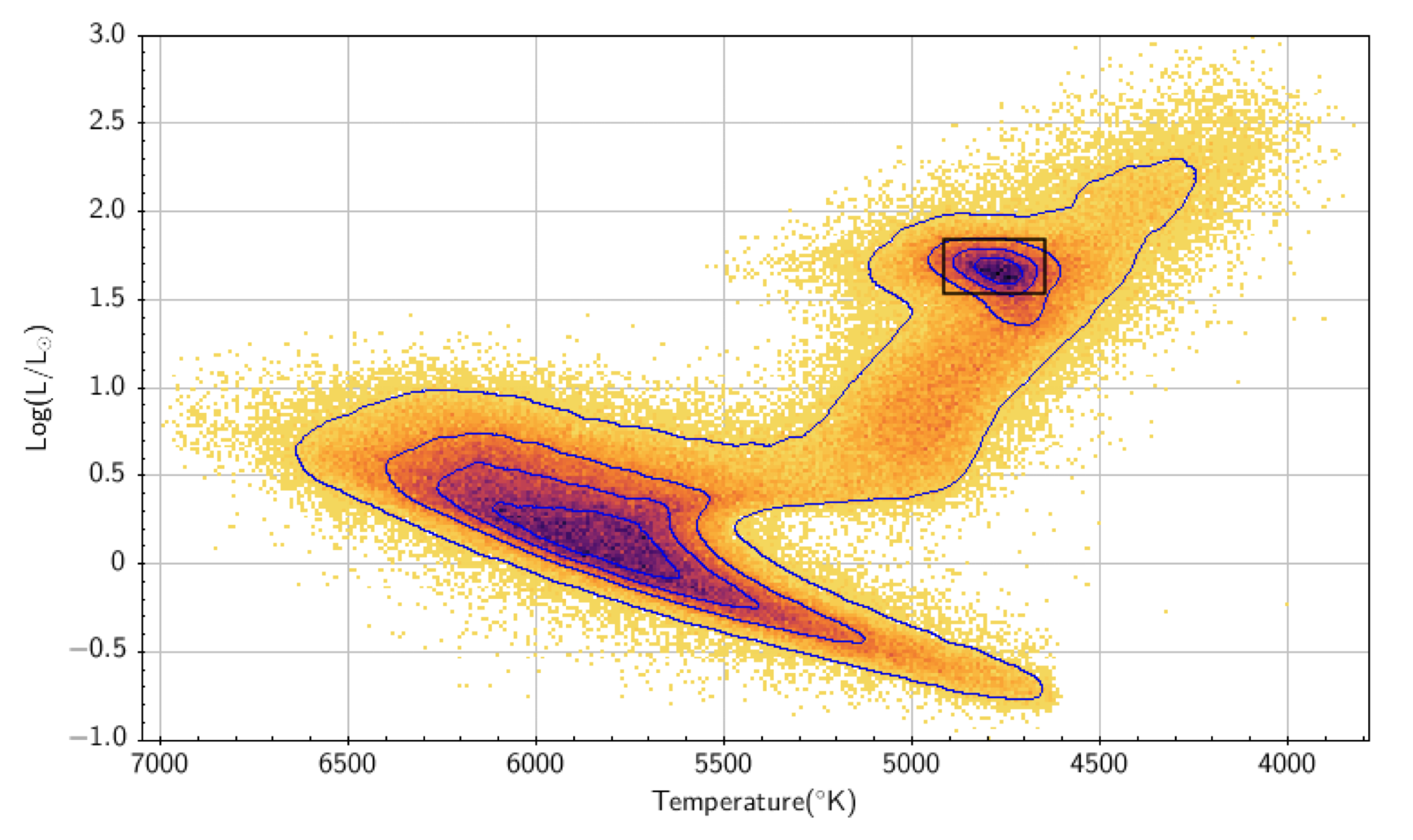
Several physical processes in RC stars remain uncertain. In this lab we will focus on tow major uncertainties: the mixing happening just above the convective core, called core boundary mixing (CBM), and the nuclar reactions rates during helium burning. We will also compare the results for stars with different metallicity.
In this lab we will investigate the impact of CBM, nuclear reaction rates and metallicity on the structure of the near core region of RC stars. The objective is to reproduce the work of Noll et al. (2024).
This maxilab is divided in two parts:
- Maxilab1 focuses on CBM and compare different mixing schemes.
- Maxilab2 tests different nuclear reaction rates.
Warning
This maxilab have been built in low time and spatial resolution (including some missing physics, like using the most basic nuclear network net and no mass loss) so one can run the MESA models within a few minutes. Therefore, you should expect your results to only match qualitatively the results of the paper.
Maxilab Part 1: Impact of convective boundary mixing on period spacing of red clump stars
Section 1: Overview
Convective Boundary Mixing
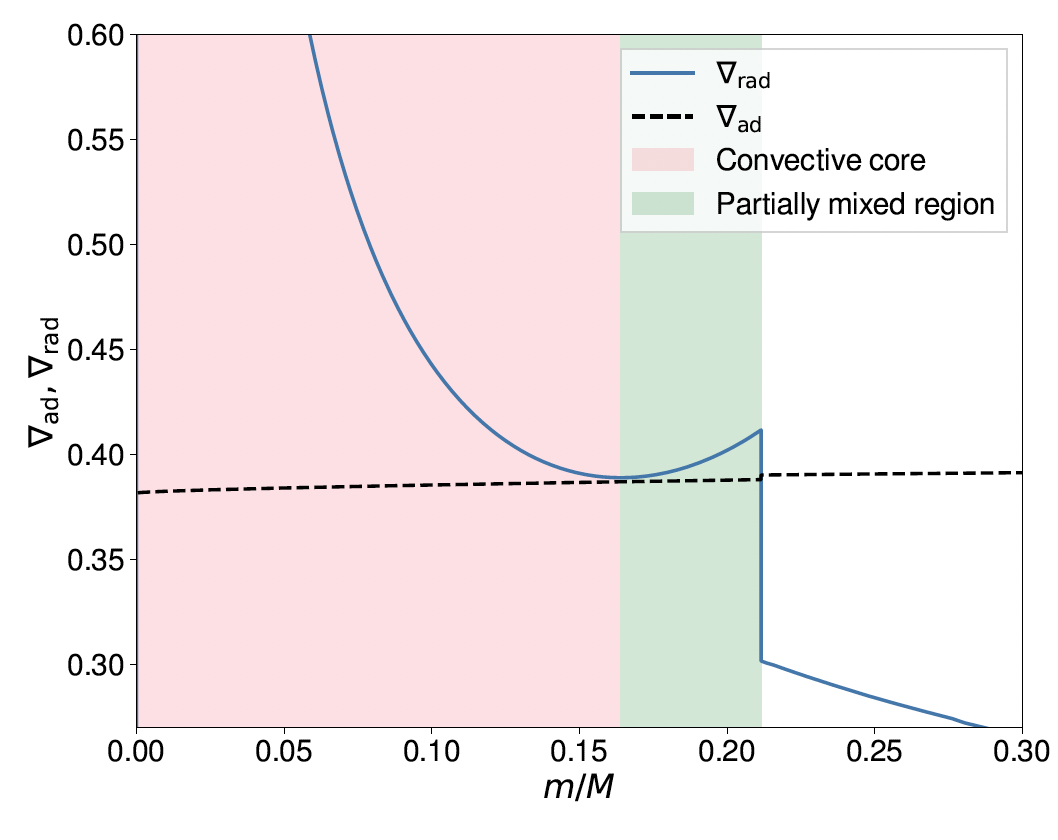
During this evolutionary stage, the burning of helium enriches the core in carbon and oxygen (via the triple- and 12C( , )16O reactions respectively), which increases the opacity and therefore the radiative temperature gradient , and cause the convective core to grow. The modified radiative temperature gradient now presents a local minimum, as illustrated on Fig. 1. This results in a Partially Mixed (PM) region between the convective core and the radiative zone, which is marginally stable, i.e. . To date, the physics of the PM region remains uncertain.
Nevertheless, one thing we know is that the properties of the PM region have a significant effect on the Brunt-Väisälä frequency profile, i.e. on the stratification inside the star. Thanks to asteroseismology, there is one observable quantity, called the period spacing , that can be used to probe the stratification inside a star thanks to its global oscillation modes. Don’t worry if you don’t know anything about asteroseismology, you will learn more about it on Friday. The only thing you need to know for now is that we can measure this period spacing for stars observed by photometry and thanks to the equation below we can infer information about the stratification in the near core region. Just for information the period spacing is defined as:
where the integral is over the region with , i.e. the radiative region. In the above equation, is the angular degree from the spherical harmonics basis.
To illustrate more intuitively the physics probed by the period spacing, we will show that its variations are linked to the size of the radiative region in a star. As such, the period spacing can also be used as a proxy size of the helium core in some cases (Montalbán et al. 2013).
Measured values of for stars observed by the Kepler telescope range between 250 and 340 s (Mosser et al. 2012, 2014, Vrard et al. 2016), which is on average larger than the values inferred from standard stellar models (Constantino et al. 2015). In order to explain measured values of the period spacing, several mechanisms have been proposed over the last decades:
- Overshooting.
- Penetrative convection.
- Semiconvection (Schwarzschild & Härm 1969, Castelani et al. 1971b).
- Maximal overshoot (Constantino et al. 2015).
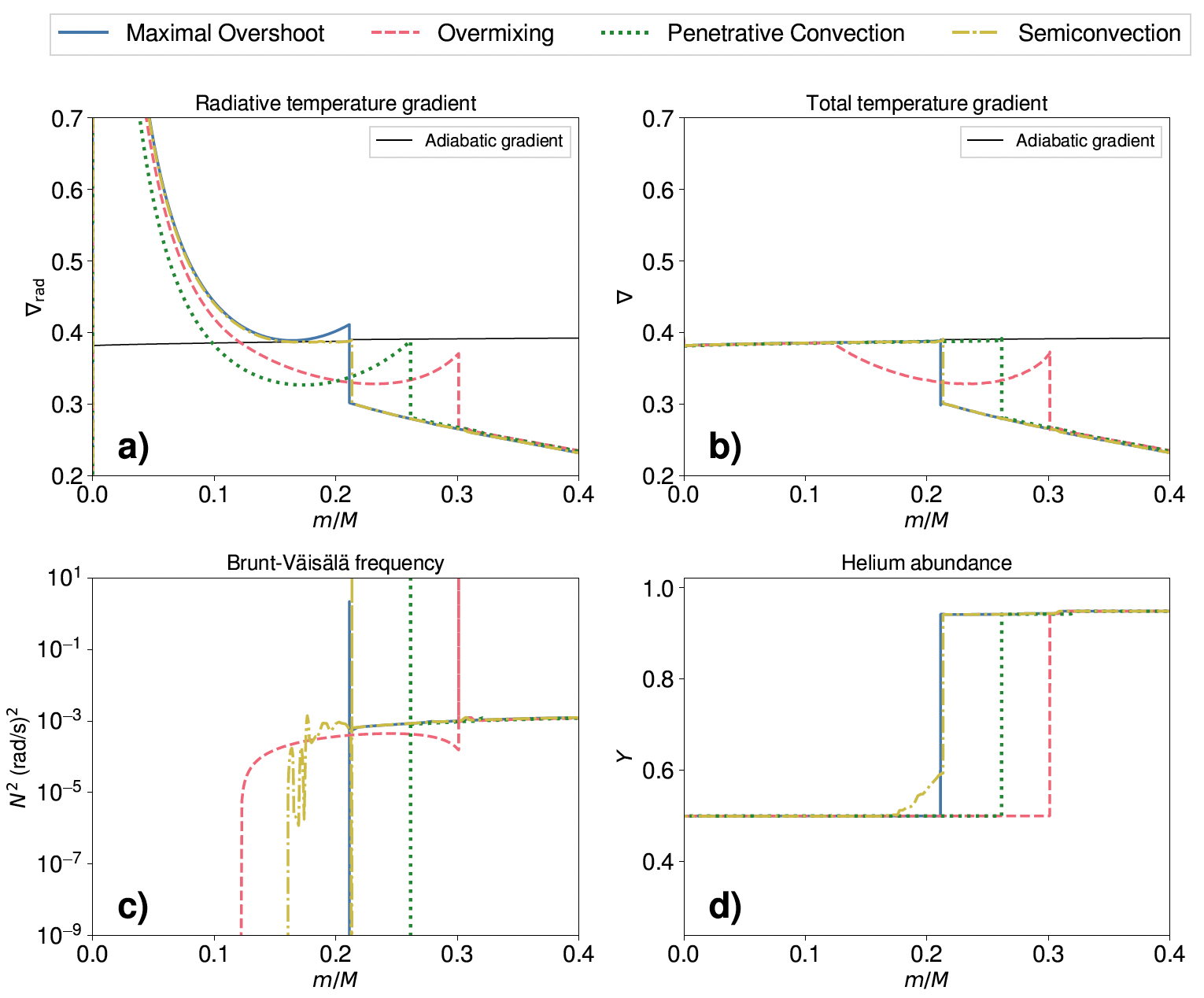
These different mixing mechanisms will impact the structure of near core region as it is illustrated in Fig. 2. The value of the period spacing inferred for these different models will then be different as we will see in this lab.
What you’ll learn
The primary purpose of the first part of the maxilab is to get you more familiar with the physics of convective boundary mixing (CBM) and how it can be modelled in MESA. You will see how to use the simplest already implemented prescription as well as how to implement more complex cases. In terms of MESA usage, you will:
- Start a project from a test suite
- Change inlists controls
- Add variables to output files (
history.data) - Customize the
pgstarwindow. - Implement a new prescription for CBM using
run_star_extras.f90
Using this Guide
Every task comes with a hint. However, if you have prior experience with MESA, do attempt to complete the task on your own. The complete solution is available here.
If you’re new to Fortran, here is a short document with some examples. Don’t let yourself get hung up by the Fortran; quickly ask your classmates and the TAs for help!
Section 2: Getting Started
Start by downloading the online repository here and uncompress it. If you want to unzip the folder using the terminal, you can use:
unzip maxilab1.zipIt contains a starting model RC_start_noMloss.mod, some inlists to control the run (inlist, inlist_projectand inlist_pgstar) and everything you need to run a MESA model.
The starting model is a based on the MESA 1M_pre_ms_to_wd test suite, which is located in $MESA_DIR/star/test_suite/1M_pre_ms_to_wd.
In order to save computing time, it as already been evolved from pre-main-sequence to after the helium flash. We thus start this lab just before the ignition of helium in the core of the star, i.e. the Red Clump. In order to reduce computing time, we have also deactivated a few of the features of the test suite such as rotation and mass loss at the surface, as these can be neglected for the purpose of this lab.
Before starting the lab, check that you can clean and compile the code:
cd maxilab1
./clean && ./mk
and then try to run the model:
./rnMake sure that you manage to start the run without any issues and break the run after a few steps using the keyboard shortcut Ctrl + C.
Note
You might see a warning message from MESA saying something like
WARNING: rel_run_E_err 13941 3.6538389571733347D+00Don’t worry, this is because the model is not very realistic (low resolution, simplified physics) in order to make it run faster.
First, let’s look at the inlist_project. As you can see the run starts by loading a model RC_start_noMloss.mod.
&star_job

      load_saved_model = .true.
      load_model_filename = 'start_RC_noMloss.mod'

/ ! end of star_job namelist
The run will stop when the central helium mass fraction is less than 0.01 in terms of mass fraction. This is done by adding the stopping condition:
&controls

      xa_central_lower_limit_species(1) = 'he4'
      xa_central_lower_limit(1) = 0.01

/ ! end of controls namelist
When this criterion is met the run stops and a MESA model named end_core_he_burn_noMloss.mod is saved, using:
&star_job

      save_model_when_terminate = .true.
      save_model_filename = 'end_core_he_burn_noMloss.mod'
      required_termination_code_string = 'xa_central_lower_limit'

/ ! end of star_job namelist
Section 3: Customizing pgstar
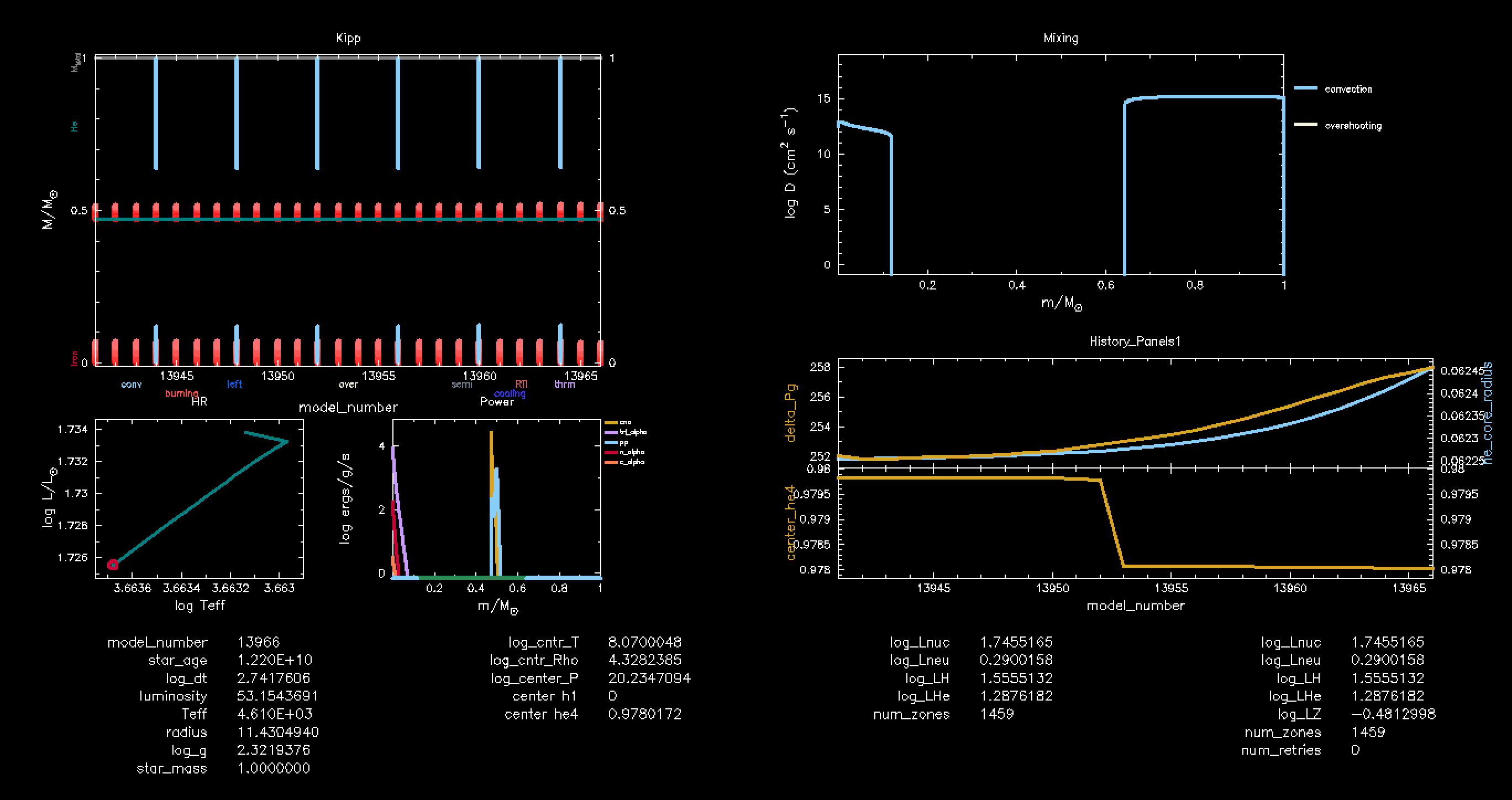
The next step is to customize the pgstar window to plot quantities relevant for the present study. The final pgstar window will contain 6 panels, including 5 figures and room for a text summary at the bottom of the window. The six panels are :
- Kippenhahn diagram
- Hertzsprung-Russel diagram
- A profile showing power from nuclear reactions data
- A mixing profile
- A text panel displaying information on the current model (age, luminosity…)
- History panel showing the period spacing and central He
In this first task, we start by adjusting the pgstar window so it can contain all the required plots. We thus initialized the 6 panels composing the window, and set up their sizes. To do so, copy paste the following code in the inlist_pgstar file, just below the line ! Set up grid layout.
Tip
You can easily copy text from a code block by clicking on the button in the top right of the block.
  ! Set up grid layout

  file_white_on_black_flag = .false.
  Grid1_file_flag = .true.

  Grid1_win_flag = .true.

  Grid1_file_interval = 5
  Grid1_file_width = 25

  Grid1_num_cols = 10
  Grid1_num_rows = 10

  Grid1_win_width = 14
  Grid1_win_aspect_ratio = 0.5
  Grid1_xleft = 0.00
  Grid1_xright = 1.00
  Grid1_ybot = 0.00
  Grid1_ytop = 1.00

  Grid1_num_plots = 6
Next, let’s add the Kippenhahn, Hertzsprung-Russell, Power and Mixing diagrams. These are all predefined plots of pgstar.
Tip
You can find information on the pgstar documentation page.
Show hint
For all these diagrams, the code to add in inlist_pgstar will be very similar. First, you need to specify the plot name using a MESA keyword:
Grid1_plot_name(:) = 'keyword'Then you indicate where the diagram will be inserted in the window:
Grid1_plot_row(:) = x
Grid1_plot_rowspan(:) = n_x
Grid1_plot_col(:) = y
Grid1_plot_colspan(:) = n_y
with x and y the row and column where the plots will be place, n_x and n_y the length in both these directions.
The first part of the answer below give the solution for the Kippenhahn diagram. You can then try to setup the other plots.
Show answer 1
This is an example but you are free to customize your window set up as you wish.
! Add Kippenhahn plot

Grid1_plot_name(1) = 'Kipp'

Grid1_plot_row(1) = 1
Grid1_plot_rowspan(1) = 5
Grid1_plot_col(1) = 1
Grid1_plot_colspan(1) = 4

Grid1_plot_pad_left(1) = 0.05
Grid1_plot_pad_right(1) = 0.01
Grid1_plot_pad_top(1) = 0.04
Grid1_plot_pad_bot(1) = 0.05
Grid1_txt_scale_factor(1) = 0.5

show_TRho_Profile_legend = .true.
show_TRho_Profile_eos_regions = .true.
Kipp_show_mixing = .true.
Kipp_show_burn = .true.
Kipp_show_luminosities = .false.
The second part of the answer gives the rest of the solution for the 3 other plots.
Show answer 2
This is an example but you are free to customize your window set up as you wish.
  ! Add HR diagram

Grid1_plot_name(2) = 'HR'
Grid1_plot_row(2) = 6
Grid1_plot_rowspan(2) = 3
Grid1_plot_col(2) = 1
Grid1_plot_colspan(2) = 2

Grid1_plot_pad_left(2) = 0.05
Grid1_plot_pad_right(2) = 0.01
Grid1_plot_pad_top(2) = 0.02
Grid1_plot_pad_bot(2) = 0.07
Grid1_txt_scale_factor(2) = 0.5

! Add Power profile plot

Grid1_plot_name(3) = 'Power'

Grid1_plot_row(3) = 6
Grid1_plot_rowspan(3) = 3
Grid1_plot_col(3) = 3
Grid1_plot_colspan(3) = 2

Grid1_plot_pad_left(3) = 0.05
Grid1_plot_pad_right(3) = 0.01
Grid1_plot_pad_top(3) = 0.02
Grid1_plot_pad_bot(3) = 0.07
Grid1_txt_scale_factor(3) = 0.5

  ! Add mixing profile

Grid1_plot_name(5) = 'Mixing'
Grid1_plot_row(5) = 1
Grid1_plot_rowspan(5) = 4
Grid1_plot_col(5) = 6
Grid1_plot_colspan(5) = 4

Grid1_plot_pad_left(5) = 0.05
Grid1_plot_pad_right(5) = 0.05
Grid1_plot_pad_top(5) = 0.04
Grid1_plot_pad_bot(5) = 0.07
Grid1_txt_scale_factor(5) = 0.5
The text summary panel gives information about the current state of the model. You can choose what information you want to be displayed. Let’s start with: age, current time step, luminosity, effective temperature, radius, mass, h1 and he4 abundances in the core, luminosity associated with h1 and he4 burning. Find the corresponding MESA variable names and add it to the inlist_pgstar file below the line ! Add text panel.
Show hint
The variables displayed in the summary text panel are taken from the history_columns.list file.
Show answer
This solution adds information for a few other variables, such as centre temperature, density and pressure. As you can see there are still some empty spots, feel free to add any variable you find interesting!
  ! Add text panel

  Grid1_plot_name(4) = 'Text_Summary1'
  Grid1_plot_row(4) = 9
  Grid1_plot_rowspan(4) = 2
  Grid1_plot_col(4) = 1
  Grid1_plot_colspan(4) = 10

  Grid1_plot_pad_left(4) = 0.00
  Grid1_plot_pad_right(4) = 0.00
  Grid1_plot_pad_top(4) = 0.00
  Grid1_plot_pad_bot(4) = 0.00
  Grid1_txt_scale_factor(4) = 0

  Text_Summary1_name(1,1) = 'model_number'
  Text_Summary1_name(2,1) = 'star_age'
  Text_Summary1_name(3,1) = 'log_dt'
  Text_Summary1_name(4,1) = 'luminosity'
  Text_Summary1_name(5,1) = 'Teff'
  Text_Summary1_name(6,1) = 'radius'
  Text_Summary1_name(7,1) = 'log_g'
  Text_Summary1_name(8,1) = 'star_mass'

  Text_Summary1_name(1,2) = 'log_cntr_T'
  Text_Summary1_name(2,2) = 'log_cntr_Rho'
  Text_Summary1_name(3,2) = 'log_center_P'
  Text_Summary1_name(4,2) = 'center h1'
  Text_Summary1_name(5,2) = 'center he4'
  Text_Summary1_name(6,2) = ''
  Text_Summary1_name(7,2) = ''
  Text_Summary1_name(8,2) = ''

  Text_Summary1_name(1,3) = 'log_Lnuc'
  Text_Summary1_name(2,3) = 'log_Lneu'
  Text_Summary1_name(3,3) = 'log_LH'
  Text_Summary1_name(4,3) = 'log_LHe'
  Text_Summary1_name(5,3) = 'num_zones'
  Text_Summary1_name(6,3) = ''
  Text_Summary1_name(7,3) = ''
  Text_Summary1_name(8,3) = ''
Last task for the pgstar window customization, we want to add a panel displaying the period spacing, the radius of the helium core and its helium content as a function of time. This is done using a History panel.
Tip
Information on how to set up a History panel can be found on this page of the MESA documentation.
Show answer
  ! Add mode history panel

  Grid1_plot_name(6) = 'History_Panels1' !
  Grid1_plot_row(6) = 5
  Grid1_plot_rowspan(6) = 4
  Grid1_plot_col(6) = 6
  Grid1_plot_colspan(6) = 5

  History_Panels1_num_panels = 2
  History_Panels1_xaxis_name = 'model_number'
  History_Panels1_yaxis_name(1) ='delta_Pg'
  History_Panels1_other_yaxis_name(1) = 'he_core_radius'
  History_Panels1_yaxis_name(2) ='center_he4'
  History_Panels1_other_yaxis_name(2) = ''
  History_Panels1_automatic_star_age_units = .true.

  Grid1_plot_pad_left(6) = 0.05
  Grid1_plot_pad_right(6) = 0.05
  Grid1_plot_pad_top(6) = 0.04
  Grid1_plot_pad_bot(6) = 0.07
  Grid1_txt_scale_factor(6) = 0.5
Before going to the next section, try to run the model:
./rnMake sure that you manage to start the run without any issues and break the run after a few steps using the keyboard shortcut Ctrl + C.
Your pgstar window is now ready, it should like the example in Fig. 3.
Section 4: Convective Boundary Mixing
Now, you are ready to focus on the physics of the problem! Convective boundary mixing refers to any mixing due to convective motions, happening just outside a convective region, in the adjacent stably stratified radiative region. In this section, we will implement different scheme to model the PM region. The comparison between their impact on the period spacing, and size of the helium core, will be done in Section 5.
Overshooting
Important
Overshooting is named overmixing in the article Noll et al (2024). We chose here to use the name overshooting as it is the one used in MESA, but these refer to the same physical phenomenon.
Overshooting is the physical mechanism which describes the penetration of convective motions in an adjacent radiative zone. In a 1D model, this mechanism is accounted for by extending the core over a distance . This extension of the core, called the overshooting region, is set using a free parameter such such that , with the pressure scale height. In the overshooting case, the temperature gradient in the overshooting region is kept radiative.
At the end of the lab, we will compare the different models that use different CBM scheme. To make this easier, the first task is to tell MESA to save outputs in different folders, this means changing the name of the LOGS and pgplot directories.
To do so, you need to add the following lines in the &controls section of inlist_project
  ! change the LOGS directory
  log_directory = 'overshooting/LOGS'
and the ones below in inlist_pgstar
  ! change the pgplot directory
  Grid1_file_dir = 'overshooting/pgplot'
In addition, we can also change the name of the output file history.data that we will use to compare the model, by adding this in the &controls section of inlist_project
! change the history file name
star_history_name = 'history_1M_OV.data'
The overshooting scheme is already implemented in MESA, it is called the overshoot_scheme(:). For this task, the aim is to add overshooting just above the helium burning convective core. What you have to do is to use the step overshoot scheme, over a distance of one pressure scale height, 1 Hp. Parameters of the overshooting scheme should added to the inlist_project.
Tip
Information on the overshooting scheme can be found on this page.
Show hint
Be careful, the overshooting distance is set with overshoot_f(:), which is not the distance from the convective boundary.
Show answer
Add the code below in the &controls of the inlist_project.
    overshoot_scheme(1) = 'step'
    overshoot_zone_type(1) = 'burn_He'
    overshoot_zone_loc(1) = 'core'
    overshoot_bdy_loc(1) = 'top'
    overshoot_f(1) = 1.01              ! in unit of Hp
    overshoot_f0(1) = 0.01             ! in unit of Hp
The meaning of these parameters are:
overshoot_scheme(:)sets the scheme that should be use (either the step or the exponential overshoot schemes).overshoot_zone_type(:)andovershoot_zone_loc(:)select to which convective zone the overshooting scheme should be applied to.overshoot_bdy_loc(:)defines is overshooting will occur above and/ or below the zone.overshoot_f0(:)defines the distancef0(in unit ofHp). The switch from convective mixing to overshooting happens at a distancef0*Hpinto the convection zone.overshoot_f(:)the overshooting distancef(in unit ofHp).
Warning
The overshooting zone starts at a distance f0 from the convective boundary (directed inside the convective zone). Thus, for an overshooting distance of 1Hp, one should consider f = 1 Hp + f0. This relates to the free parameter
as f =
+ f0.
Then, run the model with
./rnThe pgplot window will appear. On the top right, in the mixing panel, you can see the two convective zones (in blue), which are the convective core and the envelope. Once helium starts burning (after a few time steps), overshooting is taken into account (in white). As you can see, the size of these regions change with time.
You will probably see additional convective zones appearing times to times, those are numerical artefacts that should not exist in a real star. However, this is a well know issue which is amplified by the lack of accuracy of the model (physical and numerical resolution). You can just ignore them for the purpose of this lab. The only impact will be that the period spacing evolution with time will be a bit noisy and differ from monotonic variations. However, the global trend observed is still realistic.
Just below the mixing panel, in the history panel is displayed the evolution of the period spacing and helium core radius (upper panel), and the abundance of helium at the centre of the star (lower panel). Neglecting the wriggles (see comment above), the period spacing starts by increasing, reaches a maximum and then decrease until the end of the run. We will compare this quantity for all the runs with different CBM schemes at the end of the lab. As expected, the helium central mass fraction decrease with time, as the star burns helium.
Information about nuclear burning is provided in the Power panel. You can see that different nuclear reactions occur at different locations. This will be studied in Maxilab2.
Do you observe that the period spacing and radius of the helium core follow the same trend? Do you have an idea why?
Show answer
The period spacing measures the inverse of the stratification in radiative region. As the location of the convective boundary moves, this will change the size of the radiative zone, and therefore change the stratification. A smaller radiative region thus gives a larger period spacing. This just to give you an idea of the physics that is probed by the period spacing, which can be measured for actual stars. This is done using asteroseismology and will learn more about that tomorrow!
Penetrative convection
Penetrative convection is the same as overshooting except that the temperature gradient in the overshooting region is modified and set to the adiabatic one (see the difference in temperature gradient in Fig. 2). Modifying the temperature gradient in the overshooting region is currently not implemented in MESA and thus it should be done in a new subroutine penetrative_convection in run_star_extras.f90 using s% other_adjust_mlt_gradT_fraction. Therefore, we will manually modify the temperature in the overshooting region.
To help you with this task, there are already two extra subroutines that have been implemented in run_star_extras.f90. The first one eval_conv_bdy_Hp_persois used to evaluate the pressure scale height at a convective boundary. The second one eval_over_bdy_params_perso is for evaluating other parameters such as cell index k, radius r, diffusion coefficients D and convective velocity at a convective boundary. For the purpose of this lab, we just need to use the first two, the cell and index k and radius r of the convective boundary.
You can have a look at these two subroutines in run_star_extras.f90 but you do not have to edit them.
The subroutine penetrative_convection as already been declared at line 278 of run_star_extras.f90. This is where you should add the code to modify the temperature gradient.
Important
As penetrative is an extension of the overshooting scheme, you have to keep the parameters from the previous section active.
Show hint 1
You need to add a logical parameter in inlist_project to activate or deactivate the penetrative convection scheme.
Show hint 2
The call statement is used to execute a subroutine inside another subroutine.
Show hint 3
If a subroutine argument is not needed by your code after the call, and you’re only calling the subroutine to get other outputs, you can safely pass a dummy variable — as long as it has the correct type. Do not forget to declare it.
Show hint 4
For modifying the temperature gradient in the overshooting region, you can use this code block (comments are added for extra explanation):
          ! k_ob and r_ob are the index and radius of the overshoot boundary,
          ! which corresponds to the overshooting distance above the core.
          do k = k_ob, 1, -1
            r = s%r(k)

            dr = r - r_ob

            if (dr < f*Hp_cb) then     !if radius in the overshoot region
               factor = 1._dp          ! factor = 1 for adiabatic gradT
            else                       ! radius in the envelope, beyond r_ob
               factor = -1d0           ! factor = -1 for radiative gradT
            endif
            s% adjust_mlt_gradT_fraction(k) = factor
          end do
Show answer
In the %controls section of inlist_project:
x_logical_ctrl(1) = .true.In run_star_extras.f90:
    subroutine penetrative_convection(id, ierr)
          integer, intent(in) :: id
          integer, intent(out) :: ierr
          type(star_info), pointer :: s
          integer :: i, k, k_ob, first_model_number
          real(dp) :: Hp_cb, f0, r_ob, dummy, f, r, dr, factor

          ierr = 0
          call star_ptr(id, s, ierr)
          if (ierr /= 0) return

          ! The three if statement below are here to activate the penetrative
          ! convection only when and where it is needed:
          ! only activate when set to .true. in inlist project
          if (.not. s% x_logical_ctrl(1)) return
          ! don't activate when there are no convective region
          if (s% num_conv_boundaries == 0) return
          ! only activate the scheme for convective (not for envelopes).
          if (.not. s% top_conv_bdy(1)) return ! no core

          ! reads the values of the overshooting parameters f and f0
          f = s%overshoot_f(1)
          f0 = s%overshoot_f0(1)

          ! the call statement is used to execute a subroutine inside another subroutine

          ! this subroutine evaluate pressure scale height Hp at convective boundary
          call eval_conv_bdy_Hp_perso(s, 1, Hp_cb, ierr)

          ! this subroutine evaluate different variables at convective boundary
          ! dummy are just two variables that we do not need for the present case.
          ! k_ob and r_ob are the index and radius of the overshoot boundary,
          ! which the overshooting distance above the core.
          call eval_over_bdy_params_perso(s, 1, f0, k_ob, r_ob, dummy, dummy, ierr)

          do k = k_ob, 1, -1
            r = s%r(k)

            dr = r - r_ob

            if (dr < f*Hp_cb) then     !if radius in the overshoot region
               factor = 1._dp          ! factor = 1 for adiabatic gradT
            else                       ! radius in the envelope, beyond r_ob
               factor = -1d0           ! factor = -1 for radiative gradT
            endif
            s% adjust_mlt_gradT_fraction(k) = factor
          end do

       end subroutine penetrative_convection
Tip
Notice that we have also add s% other_adjust_mlt_gradT_fraction => penetrative_convection in the extra_controls section of run_star_extras.f90.
Now, rename the LOGS and pgplot folders to save the outputs in a different location than for the overshooting case. The method to do that is exactly the same as in the previous section, so try to do it yourself first! If you need help, have a look at the answer below.
Show answer
To do so, you need to add the following lines in the &controls section of inlist_project
  ! change the LOGS directory
  log_directory = 'penetrative_conv/LOGS'
and the ones below in inlist_pgstar
  ! change the pgplot directory
  Grid1_file_dir = 'penetrative_conv/pgplot'
In addition, we can also change the name of the output file history.data that we will use to compare the model, by adding this in the &controls section of inlist_project
! change the history file name
star_history_name = 'history_1M_PC.data'
Then, run the model with
./clean && ./mk
./rn
Tip
As you have modified the run_star_extras.f90 file, do not forget to ./mk before running the model!
Do you observe any difference with the previous case ?
Show answer
The temperature gradient is now adiabatic in the overshooting region (see Fig. 2), therefore the values of the Brunt-Väisälä frequency in that region is reduced. This results in larger values of period spacing.
Convective Premixing
Convective Premixing has been proposed by Schwarzschild & Härm (1969) and Castelani et al. (1971b) as a possible solution for the PM region. In these studies, the mechanism is called semiconvection (as well as in Noll et al. 2024) but we use the term Convective Premixing to be consistent with MESA denomination. Generally speaking, semiconvection refers to a region that is thermally unstable, i.e. with respect to the Schwarzschild criterion, but has a stabilizing compositional gradient, i.e. stable with respect to the Ledoux criterion. Then in this region the energy is transported by radiation but the scheme allow for some mixing in order to keep
in the PM region. This create the compositional gradient that can be observed in Fig. 2 .
Warning
In the context of this work, Convective Premixing and overshooting should not be used at the same time! However, in other contexts nothing prevent to use both at the same time, here we want to isolate the two mechanisms to compare their impacts on the model.
Therefore, start by deleting (or comment) all the commands related to overshooting and penetrative convection in inlist_project.
Alternatively, you can download a fresh inlist_project here, that can be used for this section.
This mechanism is already implemented in MESA as Convective Premixing (see Paxton et al. 2019 for details).
Tip
Information on the convective premixing scheme can be found on (this page).
Note
As noted in Noll et al. (2024): Semiconvection is sensitive to the core breathing pulses (CBP), which occur at the end of the core-helium burning phase. These pulses are sudden increases of the core size that are caused by the strong increase of energy produced by the 3α triple alpha reaction when a small (in absolute sense) but high (in relative sense) quantity of helium is injected in the core. This unstable behavior impacts both ΔΠ and the duration of the core-helium burning phase. However, CBP seem to be ruled out by observations of globular clusters and asteroseismology (Caputo et al. 1989; Cassisi et al. 2001; Constantino et al. 2017). For that reason, we avoid the increase of central helium abundance during the CHeB phase. This helps to reduce the number of CBP, without totally eliminating them.
Show answer
Delete (or comment) all the commands related to overshooting and penetrative convection in inlist_project.
Add the following command in the &controls section of inlist_project
do_conv_premix = .true.Now, rename the LOGS and pgplot folders to save the outputs in a different location than for the overshooting case. The method to do that is exactly the same as in the previous section, so try to do it yourself first! If you need help, have a look at the answer below.
Show answer
To do so, you need to add the following lines in the &controls section of inlist_project
  ! change the LOGS directory
  log_directory = 'semiconvection/LOGS'
and the ones below in inlist_pgstar
  ! change the pgplot directory
  Grid1_file_dir = 'semiconvection/pgplot'
In addition, we can also change the name of the output file history.data that we will use to compare the model, by adding this in the &controls section of inlist_project
! change the history file name
star_history_name = 'history_1M_SC.data'
Then, run the model with
./rnIn this run, there is no overshooting so the only mixing type appearing on the mixing panel will be convection (the blue one). Also, this run will take a little bit longer than the other two.
Compare the age of the star at the end of the run. For this you can look at the terminal window or at the saved png file from the pgstar window. Is there any difference with the previous cases?
Show answer
In this case, there is no overshooting, meaning there is no helium from the radiative region added in the core during the evolution, i.e. no extra fuel. Therefore the star runs out faster of helium to burn in its core.
Maximal Overshoot (Bonus exercice)
The maximal overshoot prescription is an ad hoc model introduced by (Constantino et al. 2015) in order to reproduce observations. Technically, in this scheme the overshooting distance is adjusted so that the local minimum of the radiative temperature gradient is equal to the adiabatic one . This will produce the most massive convective core possible. A core larger than this would split the core, which would results in a decrease of the period spacing. However, this method is empirical and there is no real physical arguments to support it at the moment, notably by the fact that the Schwarzschild criterion is not respected on the convective side of the external boundary.
The maximal overshoot scheme is not implemented in MESA, but we can use the predictive mixing scheme of MESA as a proxy for it.
Warning
As in the previous section, we want to isolate the impact of the Maximal overshoot scheme from other CBM prescriptions. Therefore, start be deleting all the commands related to , semiconvection, overshooting and penetrative convection the in inlist_project.
Alternatively, you can download a fresh inlist_project here, that can be used for this section.
Tip
Information on the predictive mixing scheme can be found on (this page)
Show answer
Delete all the commands related to semiconvection, overshooting and penetrative convection the in inlist_project (if not already done).
Add the following commands in the &controls section of inlist_project
    predictive_mix(1) = .true.
    predictive_zone_type(1) = 'any'
    predictive_zone_loc(1) = 'core'
    predictive_bdy_loc(1) = 'top'
    predictive_superad_thresh(1) = 5d-3
    predictive_avoid_reversal(1) = 'he4' ! the minimize the occurrence of CBP
Now, rename the LOGS and pgplot folders to save the outputs in a different location than for the overshooting case. The method to do that is exactly the same as in the previous section, so try to do it yourself first! If you need help, have a look at the answer below.
Show answer
To do so, you need to add the following lines in the &controls section of inlist_project
  ! change the LOGS directory
  log_directory = 'max_overshoot/LOGS'
and the ones below in inlist_pgstar
  ! change the pgplot directory
  Grid1_file_dir = 'max_overshoot/pgplot'
In addition, we can also change the name of the output file history.data that we will use to compare the model, by adding this in the &controls section of inlist_project
! change the history file name
star_history_name = 'history_1M_MAXOV.data'
Then, run the model with
./rnAs for the semiconvection case, there is no overshooting so the only mixing type appearing on the mixing panel will be convection (the blue one). And similarly the star runs out faster of helium to burn.
Section 5: Plotting the results
Finally, the aim is to compare the period spacing evolution for each model using different convective boundary mixing prescription. To do so, we will reproduce Figure 4 of Noll et al (2024). You can of course write a script to plot it yourself. The quantities to plot are in the history.data files.
You can also find a Google colab script here
(local copy)
. Make a copy of this notebook using File -> Save a copy in Drive. That will do the plot for you. For this, you will just to upload your history_XXX.data files for each CBM case when executing the first code cell.
Show hint
The quantities to plots are delta_Pg and he_core_radius as a function of star_age and center_he4
How does your results compare to the Fig. 4 of Noll et al. (2024)? Which model presents the highest values of period spacing? Any idea why?