This is advanced bonus content - only attempt after completing the main lab successfully.
You are required to have completed main MESA lab1 with successful overshooting parameter modifications
Learning Objectives
By completing these exercises, you will:
- Automate systematic parameter studies to explore overshooting effects across stellar masses and metallicities
- Generate publication-quality comparative plots revealing physical trends across parameter space
- Begin to understand computational trade-offs between model complexity and runtime requirements
- Analyze how different physical assumptions affect both scientific conclusions and computational efficiency
This directory contains tools to analyze your MESA models and automate running multiple models with different parameters. These tools are organized into two main categories:
- Batch Runs - Tools to automate running multiple MESA models with different parameters
- Python Analysis - Python scripts to create plots and analyze a single MESA run
Batch Running MESA (Sequentially)
What This Does
Automatically creates and runs dozens of MESA models with different parameters, then collects results for comparison. Instead of manually editing inlists lots of times, you define parameters once and let the system handle everything.
Runtime Expectations
The MESA batch run framework allows you to efficiently run multiple stellar models with different parameters. Here’s what to expect in terms of timing:
Setup time: ~10-20 minutes to configure batch runs
Individual model runtime:
- ~70-75 seconds per model (using 4 threads)
- ~105-125 seconds per model (using 2 threads)
Small batch (10 models): Completes in ~12-20 minutes
Full parameter space (128 models): Takes ~2.5-4 hours depending on thread count
If you are particularly interested in the topic, you can run larger batches outside of lab hours using the same framework.
File structure
batch_runs/
├── 0_dependency_check.py/.sh   # Verify your environment is correctly set up
├── 1_make_batch.py/.sh         # Generate inlists from CSV parameter file
├── 2_verify_inlists.py         # Verify inlists were generated correctly
├── 3_run_batch.py/.sh          # Run all inlists sequentially
├── 4_verify_outlists.py        # Verify runs completed successfully
└── 5_construct_output.py       # Extract results into CSV
Workflow for Batch Runs
Download the spreadsheet as a CSV file.
Now would be the best time to prune what you do and don’t want to run. All of our batch runs are going to be based on the csv we download from this file. We suggest selecting ~10 entries from the google spreadsheet and downloading a csv subset containing just those. For the sake of demonstration, these instructions will show outputs having had downloaded the whole csv file.
Move the spreadsheet to the bonus tasks dir (Renaming the file would make things easier – Something like Lab1.csv)
Move to the bonus tasks dir:
cd batch_runsCheck dependencies to ensure your environment is properly set up
python 0_dependency_check.pyOR
./0_dependency_check.shYou should get something like this:
-> % python 0_dependency_check.py
================================================================================
                   MESA BATCH RUNS DEPENDENCY CHECKER
================================================================================

SYSTEM INFORMATION
Python Version: 3.12.7
Operating System: Linux #1 SMP PREEMPT_DYNAMIC Tue Jun 10 16:33:19 UTC 2025
Architecture: x86_64

MESA ENVIRONMENT
Status: PROPERLY SET
MESA_DIR: /home/[username]/MESA/mesa
MESASDK_ROOT: /home/[username]/MESA/mesasdk
MESA Threads: 2

PYTHON MODULES
numpy (v1.26.4): INSTALLED
matplotlib (v3.9.2): INSTALLED
pandas (v2.2.2): INSTALLED
mesa_reader: INSTALLED
scipy (v1.13.1): INSTALLED
PIL (v11.1.0): INSTALLED

COMMAND LINE TOOLS
python3 (v3.12.7): INSTALLED
gfortran (v13.3.0): INSTALLED

BATCH DIRECTORY STRUCTURE
../runs/: EXISTS
../batch_inlists/: MISSING

================================================================================
 ALL DEPENDENCIES SATISFIED! YOU'RE READY TO RUN BATCH SIMULATIONS!
================================================================================
You MESA environment should not have any issues if you have already completed lab1. Missing python modules can be installed with the pip package installer for Python, e.g.
pip install numpyNOTE: batch_inlists is missing, this is fine. Once we run 1_make_batch we will create that directory.
Generate inlists using a CSV file of parameter combinations
python 1_make_batch.py ../Lab1.csvOR
./1_make_batch.sh ../Lab1.csvYou will be prompted for enabling pg_star - for batch runs this is generally not advised.
NB you should point to wherever the csv is and whatever you named it. In the case above, the csv file was in bonus_tasks/ (the directory up from batch_runs\) and named Lab1.csv.
This creates a separate inlist for each parameter set in the ../batch_inlists/ directory.
NOTE: we can now return step 0 and check that ../batch_inlists/ turns from MISSING to EXISTS.
Verify inlists similar to before
-> % python 2_verify_inlists.py
Usage: 2_verify_inlists.py <csv_file> [inlist_dir]
And so for the example being described here, we run:
-> % python 2_verify_inlists.py ../Lab1.csv
Found 128 inlist files in ../batch_inlists

File Existence Summary:
  - Total CSV entries: 132
  - Matched inlist files: 132
  - Missing inlist files: 0

Verifying inlist parameters...

Parameter Verification Summary:
  - Total inlists verified: 128
  - Inlists without issues: 128
  - Inlists with issues: 0
This checks the inlist files for any weird things that may have happened. If there are missing inlists, try running step (1) again, preferably the method you didn’t try first time.
Run the models (this may take a while depending on the size of your input csv)
-> % python 3_run_batch.py
Found 128 inlist files in bonus_tasks/batch_inlists

You are about to run 128 MESA simulations.
Do you want to continue? (yes/no): yes
[1/128] Processing inlist_M2_Z0.0140_noovs...
Running MESA with inlist_M2_Z0.0140_noovs parameters...

...
OR
-> % ./3_run_batch.sh
Checking environment...
WARNING: Moving to working directory.
Found 128 inlist files in bonus_tasks/batch_inlists

You are about to run 128 MESA simulations.
Do you want to continue? (yes/no): yes
[1/128] Processing inlist_M15_Z0.0014_exponential_fov0.01_f00.001...
Running MESA with inlist_M15_Z0.0014_exponential_fov0.01_f00.001 parameters...

...
Each model is run sequentially with results saved to ../runs/
Verify output
We can let step (3) run for some time. After, we can check how those runs performed, below shows the output for running the batch runs for some of the parameters found in the csv but stopping it early.
-> % python 4_verify_outlists.py ../MESA_Lab.csv
Found 34 run folders in ../runs

Verification Summary:
- Total CSV entries: 132
- Matched runs: 34
- Missing runs: 97
- Mismatched runs: 1

Missing runs (no corresponding run folder):
- Row 37: inlist_M5_Z0.014_exponential_fov0.01_f00.005
- Row 38: inlist_M5_Z0.014_exponential_fov0.01_f00.01
- Row 39: inlist_M5_Z0.014_exponential_fov0.03_f00.001

...

- Row 131: inlist_M30_Z0.0014_step_fov0.04_f00.001
- Row 132: inlist_M30_Z0.0014_step_fov0.04_f00.005
- Row 133: inlist_M30_Z0.0014_step_fov0.04_f00.01

Mismatched runs (parameters do not match CSV):
- Row 36: inlist_M5_Z0.014_exponential_fov0.01_f00.001
 * inlist_project file is missing

Checking run completion status...

Run Status Summary:
- Completed runs: 33
- Incomplete runs: 0
- Failed runs: 0

Some issues were found with the MESA runs. Please review the details above.
We can see that we fully ran 33 iterations, 1 iteration was corrupted (likely what was running when it was halted) and 97 were not ran.
Analyze the results collectively
To construct a csv file that is populated with the outputs of these model runs we can run step (5). This should automatically create a csv file with all that is needed for creating plots.
-> % python 5_construct_output.py
Loaded runtime data for 33 models.
Processed: inlist_M2_Z0.014_noovs
Processed: inlist_M2_Z0.014_exponential_fov0.01_f00.001
Processed: inlist_M2_Z0.014_exponential_fov0.01_f00.005
Processed: inlist_M2_Z0.014_exponential_fov0.01_f00.01
Processed: inlist_M2_Z0.014_exponential_fov0.03_f00.001
Processed: inlist_M2_Z0.014_exponential_fov0.03_f00.005
Processed: inlist_M2_Z0.014_exponential_fov0.03_f00.01
Processed: inlist_M2_Z0.014_exponential_fov0.1_f00.001
Processed: inlist_M2_Z0.014_exponential_fov0.1_f00.005
Processed: inlist_M2_Z0.014_exponential_fov0.1_f00.01
Processed: inlist_M2_Z0.014_step_fov0.1_f00.001
Processed: inlist_M2_Z0.014_step_fov0.1_f00.005
Processed: inlist_M2_Z0.014_step_fov0.1_f00.01
Processed: inlist_M2_Z0.014_step_fov0.3_f00.001
Processed: inlist_M2_Z0.014_step_fov0.3_f00.005
Processed: inlist_M2_Z0.014_step_fov0.3_f00.01
Processed: inlist_M2_Z0.0014_noovs
Processed: inlist_M2_Z0.0014_exponential_fov0.01_f00.001
Processed: inlist_M2_Z0.0014_exponential_fov0.01_f00.005
Processed: inlist_M2_Z0.0014_exponential_fov0.01_f00.01
Processed: inlist_M2_Z0.0014_exponential_fov0.03_f00.001
Processed: inlist_M2_Z0.0014_exponential_fov0.03_f00.005
Processed: inlist_M2_Z0.0014_exponential_fov0.03_f00.01
Processed: inlist_M2_Z0.0014_exponential_fov0.1_f00.001
Processed: inlist_M2_Z0.0014_exponential_fov0.1_f00.005
Processed: inlist_M2_Z0.0014_exponential_fov0.1_f00.01
Processed: inlist_M2_Z0.0014_step_fov0.02_f00.001
Processed: inlist_M2_Z0.0014_step_fov0.02_f00.005
Processed: inlist_M2_Z0.0014_step_fov0.02_f00.01
Processed: inlist_M2_Z0.0014_step_fov0.04_f00.001
Processed: inlist_M2_Z0.0014_step_fov0.04_f00.005
Processed: inlist_M2_Z0.0014_step_fov0.04_f00.01
Processed: inlist_M5_Z0.014_noovs
CSV summary saved to: ../filled_Lab1.csv
Python Analysis and Visualization
Overview
After completing your first MESA model run, you can use these Python scripts to create publication-quality plots and analyze your results. These scripts work as either Single Model Analysis or Batch Analysis.
Location and Usage
cd bonus_tasks/python_analysis

# These scripts work for both single and batch analysis
python hr_plot.py           # HR diagrams (single track or multiple tracks)
python conv_core_plot.py    # Core evolution (one star or parameter study)
python composition_plot.py  # Chemical profiles (final model or comparative)
All plots and animations are saved to plots/ directory.
hr_plot.py - Hertzsprung-Russell Diagram Generator
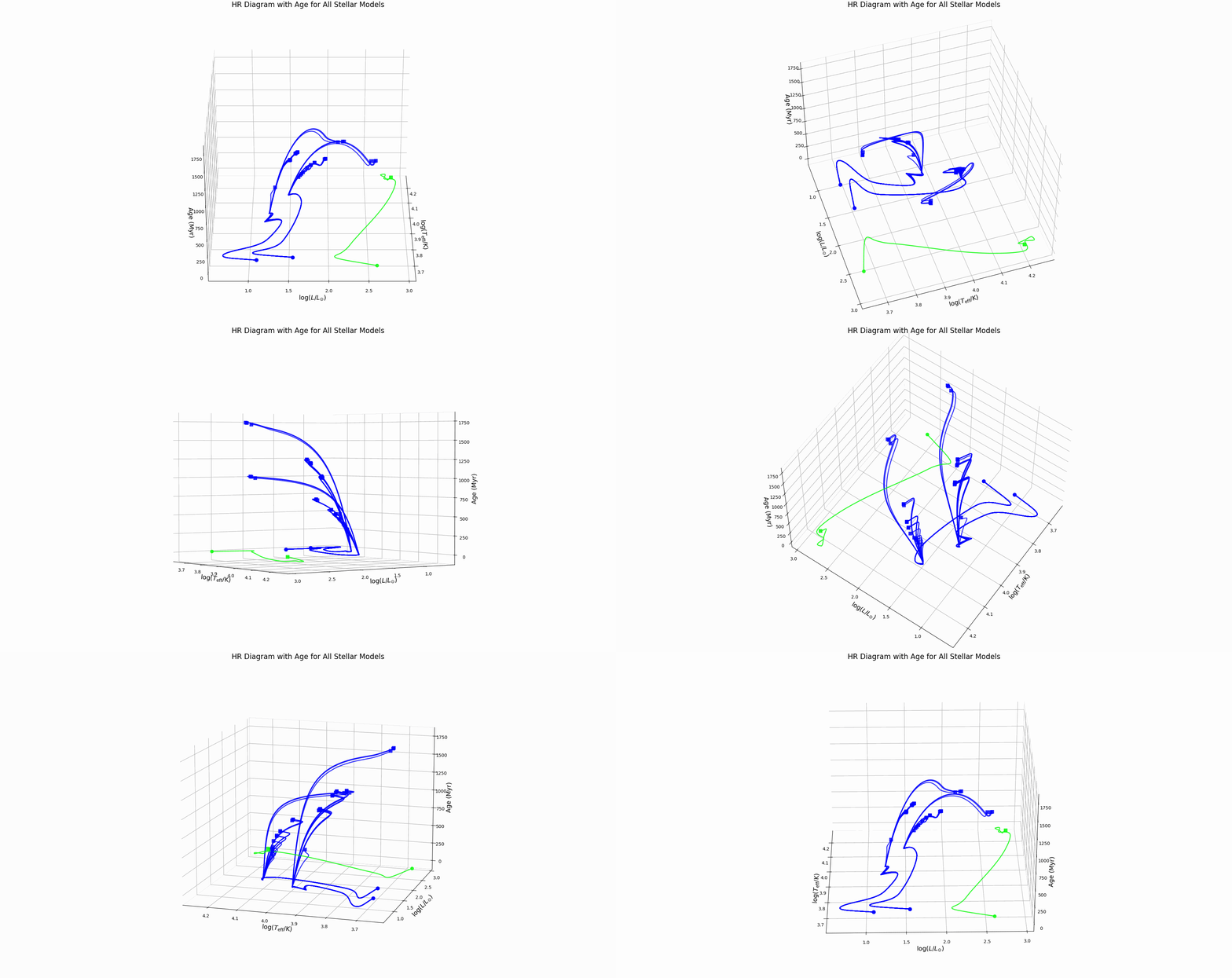
Creates the fundamental diagram of stellar astrophysics showing how stars move through temperature-luminosity space during evolution.
Output:
hr_diagram.png: Evolutionary track with color-coded evolutionary phaseshr_diagram_3d.png: 3D version with stellar age as the third dimensionall_hr_diagrams.png: Multiple evolutionary tracks color-coded by mass, line-coded by overshooting schemeall_hr_diagrams_3d.png: 3D comparative view showing age evolution for all modelshr_diagram_3d_rotation.gif: Animated 3D plot rotating to show all viewing angles
What the Script Does
Data Processing:
- Loads
log_Teff(effective temperature) andlog_L(luminosity) from history files - For single models: Creates color mapping based on central hydrogen abundance
- For batch models: Assigns colors by stellar mass, line styles by overshooting scheme
- Identifies key evolutionary points (ZAMS, TAMS) when hydrogen abundance data available
Interpretation
Key Features:
- Main Sequence: Nearly horizontal tracks where stars spend most of their lives
- Turn-off Points: Where tracks bend upward, marking hydrogen exhaustion
- Mass Effects: More massive stars (brighter, hotter) have shorter main sequence lifetimes
- Overshooting Effects: Stronger overshooting extends main sequence evolution – do we see this?
Physical Insights:
- Track length shows main sequence lifetime
- Turn-off luminosity indicates stellar mass
- Comparison between models reveals overshooting effects on evolutionary timescales
conv_core_plot.py - Convective Core Mass Evolution
Tracks how the convective core (the star’s energy-producing region) changes throughout stellar evolution. This is a good way of directly revealing overshooting effects.
Output
core_mass_evolution.png: Absolute core mass vs. stellar agecore_mass_fraction.png: Core mass as percentage of total stellar mass vs. agecore_mass_vs_log_age.png: All models overlaid showing core mass evolutioncore_mass_fraction_vs_log_age.png: Fractional core masses for comparison
What the Script Does
Data Processing:
- Searches for core mass data (
he_core_mass,mass_conv_core, orconv_mx1_top) - Converts stellar age to Myr (millions of years) for readable timescales
- For batch analysis: Color-codes by overshooting scheme
Interpretation
Core Mass Growth Patterns:
- Rising trends: Core grows as hydrogen burns and convective boundary moves outward
- Plateaus: Periods of stable core size
- Sharp increases: Convective boundary jumps due to composition changes
- Final values: Determine post-main sequence evolution path
Overshooting Effects:
- No overshooting: Sharp core boundaries, smaller final core masses
- Exponential overshooting: Gradual core growth, larger final masses
- Step overshooting: Intermediate behavior with discrete boundary extensions
Mass Dependencies:
- Higher mass stars: Larger cores, faster evolution
- Lower mass stars: Smaller cores, longer main sequence lifetimes
- Metallicity effects: Lower Z stars may show different core evolution patterns
Why This Matters: Core mass directly determines:
- Main sequence lifetime (larger cores burn longer)
- Post-main sequence evolution (helium flash vs. non-degenerate helium burning)
- Final stellar remnant type (white dwarf, neutron star, black hole)
composition_plot.py - Chemical Composition Analysis
Purpose
Reveals the star’s internal chemical structure, showing how nuclear burning and mixing processes distribute elements throughout the stellar interior.
Single Model Output
composition_profile.png: Hydrogen, helium, and metal abundances vs. mass coordinate at the final evolutionary model
Batch Model Output
core_evolution_all_models.png: Core mass fraction evolution for all models (comparative timeline)hydrogen_profiles_all_models.png: Final hydrogen profiles overlaid for all models
What the Script Does
Data Processing:
- Loads final profile files containing internal stellar structure
- Extracts mass fractions for hydrogen (X), helium (Y), and metals (Z)
- For single models: Plots all three species vs. mass coordinate
- For batch models: Focuses on hydrogen profiles and core evolution comparison
Mass Coordinate System:
- X-axis: Mass coordinate (m/M_total) from 0 (center) to 1 (surface)
- Y-axis: Mass fraction (0 to 1) for each chemical species
As a star evolves, its radius changes dramatically - a star can expand by factors of 10-100 during evolution. But the mass distribution within the star changes much more slowly. Mass coordinate m/M_total = 0.2 always refers to 20% of the star’s material and so it is much more age agnostic than actual radius. This allows for a much more universal and physically meaningful comparison of such features between stars.
Interpretation
Profile Features:
- Hydrogen (blue): Primary fuel, depleted in core, preserved in envelope
- Helium (red): Nuclear burning product, concentrated where hydrogen was processed
- Metals (green): Heavy elements, largely unchanged by hydrogen burning
Mixing Signatures:
- Sharp gradients: Indicate composition discontinuities at mixing boundaries
- Smooth transitions: Show regions affected by convective mixing or overshooting
- Plateau regions: Chemically homogeneous zones due to efficient mixing
Overshooting Effects:
- No overshooting: Sharp composition boundaries, steep gradients
- Strong overshooting: Extended smooth composition profiles, larger chemically mixed regions
- Intermediate overshooting: Gradual transitions between core and envelope compositions
Stellar Structure Information:
- Core boundary: Where hydrogen drops to ~0 and helium peaks
- Envelope composition: Relatively unchanged from initial values
- Transition zones: Regions where burning and mixing compete
Astrophysical Implications:
- Surface abundances: What we observe spectroscopically
- Core composition: Determines next evolutionary phase
- Mixing efficiency: Affects stellar lifetimes and nucleosynthesis
- Chemical evolution: How stars contribute to galactic chemical enrichment
plot_timing.py - Runtime Performance Analysis
Purpose
Plot runtime versus different features to see what makes MESA slow.
Output
runtime_3d_plot.png: 3D scatter plot showing runtime vs. mass, overshooting parameter, and schemeruntime_2d_plot.png: 2D plot with mass vs. metallicity, colored by runtime, sized by overshooting strength
What the Script Does
Data Processing:
- Loads runtime data from
../run_timings.csv(created during batch runs) - Extracts stellar parameters from model filenames:
- Mass, metallicity, overshooting scheme, f_ov, f0 parameters
- Creates visualization showing performance patterns
Interpretation
Runtime Dependencies:
- Mass effects: Higher mass stars typically run faster (fewer timesteps to main sequence termination)
- Overshooting effects: More complex overshooting schemes may increase computational cost
- Metallicity effects: Lower metallicity can affect convergence and timestep size
- Numerical stability: Some parameter combinations are computationally more challenging
Reflection and Analysis Questions
After completing the batch runs and visualization exercises, consider these questions:
- How does overshooting efficiency affect stellar evolution differently for 2 solar mass versus 15 solar mass stars? When could it be considered ‘more important’?
- Which parameter combinations required the longest computational time, and what physical processes might explain this?
- How would you design an optimal parameter study to answer a specific research question while minimizing computational cost?
- What trade-offs exist between parameter space coverage and computational feasibility?
- What aspects of the batch processing workflow could be improved for larger-scale research applications?
- How could you validate your batch results against observational data?
- What uncertainties might affect conclusions drawn from parameter studies like these?
Technical Requirements
To run these scripts, you’ll need:
Python 3.6+ with the following packages:
numpymatplotlibmesa_reader(for parsing MESA output)pandas(for data manipulation)
MESA environment variables properly set:
MESA_DIRMESASDK_ROOT
The dependency check script will verify these requirements for you.
Troubleshooting
- If plots don’t appear, check if your MESA run generated the required history and profile files
- For batch runs, examine individual log files in
../runs/[model_name]/run.log - Ensure your CSV file has the correct format (see
Lab1.csv) - For Python errors, verify you have all required packages installed
Installing MESA Reader
MESA Reader is a Python package for analyzing output from the MESA stellar evolution code.
Option 1: Installation with pip
The simplest method using Python’s package manager:
# Standard installation
pip install mesa-reader

# User-specific installation (no admin rights needed)
pip install --user mesa-reader
Option 2: Installation from source
For the latest development version:
# Clone the repository
git clone https://github.com/wmwolf/py_mesa_reader.git

# Navigate to the directory
cd py_mesa_reader

# Install in development mode
pip install -e .
Further Customisation
You are free to use these scripts however you like in the future. Some ideas:
- Edit plotting styles in the Python files
- Add new parameters to the CSV file and plot those
- Modify inlist generation in
make_batch.py– grids need not be linear, continuous or square - Create your own analysis scripts based on the provided examples