Lab 3: Rotational Splitting of Stellar Oscillation Modes
In this lab, you will explore how rotation affects the frequencies of stellar oscillation modes. You will compute mode frequencies for rotating stellar models using GYRE, visualize the results with echelle diagrams, and compare your findings to the rotational splitting you estimated in Lab 1.
Learning Goals
- Understand how rotation lifts the m-degeneracy of non-radial modes.
- Visualize rotational mode splitting in an echelle diagram.
- Compare GYRE-computed frequency splittings with the (rotational splitting of g-modes) you measured in Lab 1.
1. Background: Why Rotation Splits Modes
In a non-rotating star, modes with the same radial order and angular degree , but different azimuthal order , have the same frequency — they are degenerate. When the star rotates, this degeneracy is broken:
- Prograde modes ( < 0) shift to higher frequencies
- Retrograde modes ( > 0) shift to lower frequencies
- The splitting between adjacent m values is proportional to the star’s internal rotation rate
2. Choosing a Rotating Model
For this lab, you will continue to use the rotating stellar model that you made in Lab 1, with the nu_max value that you chose in the google sheet.
3. Enabling Rotation in GYRE
Start by copying your gyre.in file from Lab 2 to a new file called gyre_rot.in.
In your gyre_rot.in, include the following blocks to enable rotation and compute non-zero m modes:
&rot
  Omega_rot_source = 'MODEL'
  coriolis_method = 'TAR'
/

&mode
  l = 1
  m = -1
  tag = 'non-radial'
/
&mode
  l = 1
  m = 0
  tag = 'non-radial'
/
&mode
  l = 1
  m = 1
  tag = 'non-radial'
/
Note: do NOT delete the radial mode block! You still want to calculate those. There is only m=0 for these modes.
The modes will also be split, however this will add a bit of computing time to your model. You can choose to calculate these modes as well if you like. The modes have m values .
Make sure you still have a &scan block that pairs with tag_list = 'non-radial' and covers a suitable frequency range (e.g., 100–300 μHz).
4. Output Format
Before running GYRE, make sure to create a folder called lab3_details mkdir -p lab3_details, where your output files will be saved.
Save the summary and detail files in human-readable format. For example:
&ad_output
  summary_file = 'lab3_details/summary_rot.txt'
  summary_file_format = 'TXT'
  freq_units = 'UHZ'
  summary_item_list = 'l,m,n_pg,n_p,n_g,freq,freq_units,E_norm,E_p,E_g'
  detail_template = 'lab3_details/detail.l%l.n%n.h5'
  detail_item_list = 'l,n_pg,omega,x,xi_r,xi_h,c_1,As,
                      V_2,Gamma_1,rho,P,R_star,M_star'
/| ⚠️ CHECKPOINT |
|---|
| If you should need it, you can compare your namelist file with a sample one that we have provided here. |
Once you’ve added all the above lines, go ahead and calculate the frequencies using
$GYRE_DIR/bin/gyre gyre_rot.in5. Echelle Diagram and Rotational Splitting
The animation below compares the echelle diagrams from Lab 2 (no rotation) and Lab 3 (with rotation).
Notice how the
ridge clearly splits in the rotating case:
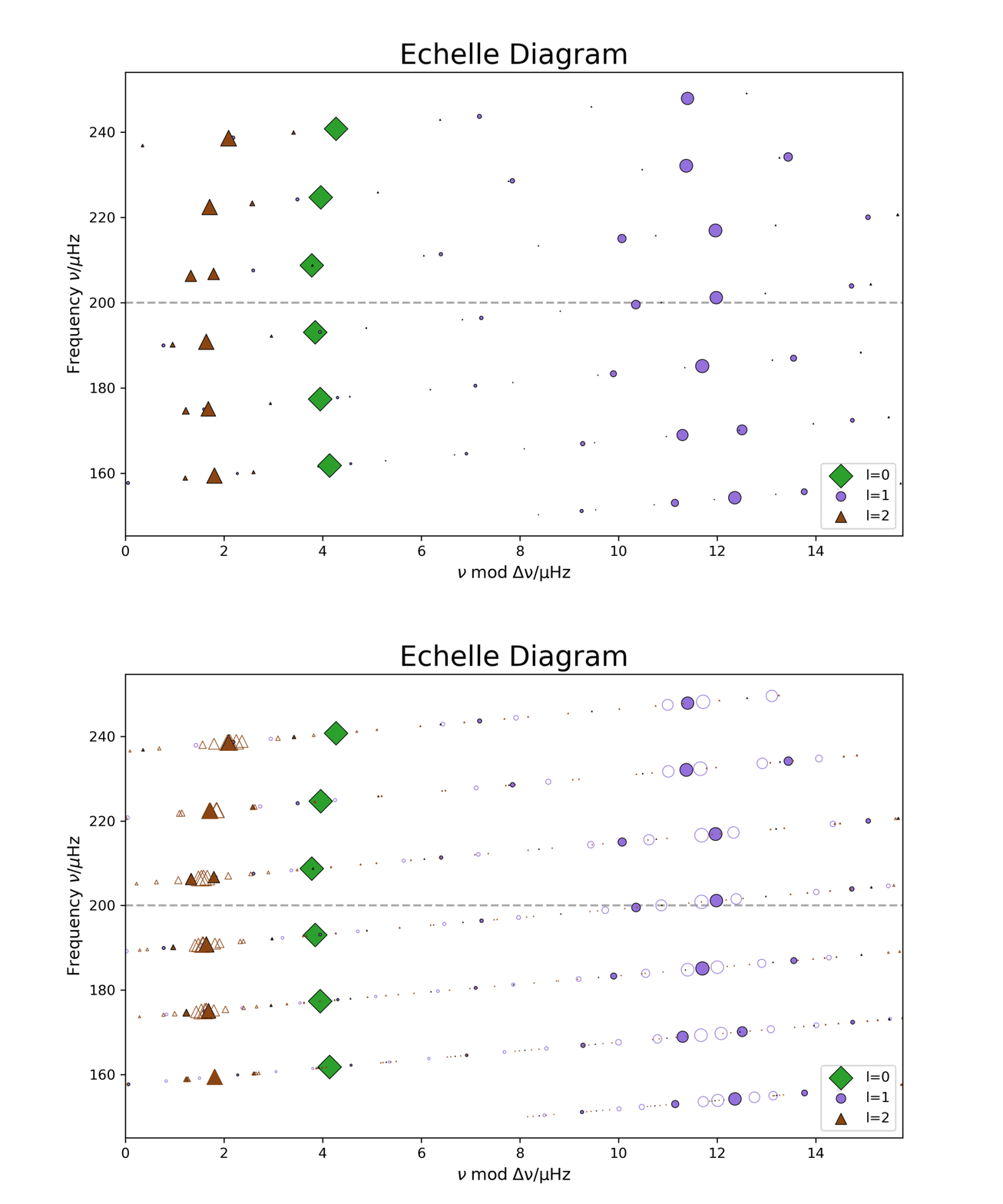
Once your GYRE run is complete:
- Use the output to plot an echelle diagram. (You can use the same Google Colab from Lab 1 here. Make sure you update the path to the new summary_rot.txt file in the colab!)
- You should see that the ridge is now split into three distinct components, corresponding to
- This is called rotational splitting
Now compare the observed splitting in the diagram with the you measured in Lab 1
For instance:
- For each value of , we may estimate the rotational splitting by either computing the difference between the and mode frequencies, or from half the difference between the and frequencies. Do these agree? How does this change as a function of the mode frequency?
- Check if this roughly matches the rotation rate implied by from the g-mode period spacing, using values computed from Lab 1.
Note on Mode Shifts
When using the Traditional Approximation of Rotation (TAR) along with the Cowling approximation, the m = 0 modes may show a slight frequency shift compared to the non-rotating case. This is not a splitting but rather a systematic offset introduced by the TAR treatment, particularly noticeable in high-order g-modes.
The Big Picture
The JWKB estimators that we computed in Lab 1 are limiting values for pure p- and pure g-mode rotationa splittings. On the other hand, the mixed modes in red giants can be interpreted naturally as possessing some combination of g-like character (with g-modes confined to the core of the star), and p-like character (with p-modes propagating in the envelope of the star). Thus, we would anticipate the rotational splittings of a mixed mode to take some intermediate value between one and the other. Red giants also tend to have cores that rotate much more quickly than the envelopes. Thus, considered as a function of frequency, we would expect to see the rotational splittings to be small at frequencies similar to those of pure p-modes, and large for frequencies close to pure g-modes.
Optional Exploration
Try changing the rotation source in GYRE:
Omega_rot_source = 'UNIFORM'
Omega_rot = ## ! some number
Omega_rot_units = 'CRITICAL' ! Fraction of critical rotation rate
This will enforce a constant rotation rate. How does this affect the splitting pattern?
Tips
- Use the same frequency scan range as in Lab 2 for easier comparison (e.g., 100–300 μHz)
- Don’t forget to use enough frequency resolution (
n_freq = 2000) in the&scanblock for non-radial modes
Let us know if you run into any trouble — and have fun seeing rotation in action!
Lab 3 BONUS: Rotation Kernels (Python Exercise)
Rotation Kernels and Rotational Splitting
In this section, we compute rotation kernels for selected dipole modes and use them to estimate the rotational splitting and the Ledoux constant (via ) assuming solid-body rotation.
What Is a Rotation Kernel?
A rotation kernel describes how sensitive a given mode is to rotation at different depths inside the star. For small rotation rates, the first-order perturbation to the mode frequency is:
where is the rotation profile and is the azimuthal order of the mode.
Step-by-Step Instructions
- Load a model and detail files for several selected modes using
pygyre. - Extract eigenfunctions , , density , and coordinate .
- Calculate mode inertia:
- Compute the rotation kernel :
- Estimate:
- Interpret the result:
- High-order -modes typically have , meaning they are more sensitive to core rotation.
- -modes tend to have , sensitive to envelope rotation.
Example Output
    n     β (1-C)    δω (μHz)
------------------------------
  -29  0.7242+0.0000j  2.5840+0.0000j
  -30  0.8121+0.0000j  1.7557+0.0000j
...
  -38  0.7199+0.0000j  2.6305+0.0000j
  -39  0.6895+0.0000j  3.0290+0.0000j
...
  -65  0.5325+0.0000j  4.6219+0.0000j
In this example, lower-order -modes (e.g., ) exhibit smaller δω and larger β, while higher-order modes are more sensitive to the inner rotation rate.
Coding Notes
- Place functions (e.g., for kernel and inertia computation) in
rotation.py. - Write a clean
main.pyto iterate over selected modes, compute quantities, and print results. - You can optionally plot to visualize where a mode is sensitive to rotation.
Full Solutions
A sample implementation of the integration to obtain rotational kernels and splittings can be found here.
# main.py
from rotation import read_model, read_details, compute_splitting
import glob
import os

model_file = 'model.GYRE'
detail_dir = 'lab3_details'
detail_files = sorted(glob.glob(os.path.join(detail_dir, 'detail.l1.n*.txt')))

model = read_model(model_file)
ρ, r, Ω, ξrs, ξhs = read_details(model, detail_files)

print(f"{'n':>5} {'β (1-C)':>12} {'δω (μHz)':>12}")
print("-" * 30)

for fname, ξr, ξh in zip(detail_files, ξrs, ξhs):
    try:
        # Extract radial order n from filename
        n_str = os.path.basename(fname).split('.n')[-1].split('.txt')[0]
        n = int(n_str)

        β, δω = compute_splitting(Ω, ρ, r, ξr, ξh, l=1)
        print(f"{n:5d} {β:12.4f} {δω*1e6:12.4f}")
    except Exception as e:
        print(f"Failed on {fname}: {e}")